
Last updated: October 2026 | Prices checked against OnPay’s and Gusto’s official pricing pages
Disclosure: SmallBiz Stack is reader-supported. Some links on this site may be affiliate links, which means we may earn a commission at no extra cost to you. This never changes our verdicts. Prices change often, so confirm the current rate on the vendor’s site before you sign up.
OnPay and Gusto start at exactly the same price: $49 a month plus $6 per person. The difference is what you get for it. OnPay puts multi-state payroll, unlimited pay runs and full tax filing into one plan and sells HR and time tracking as add-ons. Gusto’s entry plan is limited to one state, and you move up to Plus or Premium for more features.
OnPay vs Gusto at a glance
| OnPay | Gusto | |
|---|---|---|
| Entry price | $49/mo + $6 per worker | $49/mo + $6 per person (Simple) |
| Plans | One payroll plan + add-ons | Simple, Plus, Premium |
| Multi-state payroll | Included | Plus and Premium only |
| Unlimited pay runs | Yes | Yes |
| Time tracking | Add-on ($15 + $4 per worker) | Included in Plus and Premium |
| HR tools | Add-on (from $15 + $2 per worker) | Premium (HR guidance) |
| Benefits admin | Free integration; you pay premiums | Available |
| Support | Phone, chat and email | Basic on Simple and Plus; dedicated partner on Premium |
OnPay pricing in 2026
OnPay’s Payroll Essentials plan costs $49 a month plus $6 per worker and includes W-2s and 1099s, unlimited pay runs and schedules, federal, state and local tax filings, paying workers in multiple states, and expert support by phone, chat and email. OnPay lists no implementation fees and advertises a free first month.
| OnPay add-on | Price |
|---|---|
| HR | $15 base + $2 per worker |
| Time tracking | $15 base + $4 per worker |
| HR + time tracking | $21 base + $4 per worker |
| Benefits integration | Free (you pay plan premiums) |
Gusto pricing in 2026
| Gusto plan | Base | Per person | Key additions |
|---|---|---|---|
| Simple | $49/mo | $6/mo | Payroll in one state, unlimited runs, tax filings |
| Plus | $80/mo | $12/mo | Multi-state payroll, time tracking, next-day direct deposit |
| Premium | $180/mo | $22/mo | HR guidance, dedicated account partner, same-day pay |
Cost comparison
| Team | OnPay payroll | Gusto Simple (one state) | Gusto Plus (multi-state + time tracking) | OnPay + time tracking |
|---|---|---|---|---|
| 5 people | $79 | $79 | $140 | $114 |
| 10 people | $109 | $109 | $200 | $164 |
| 25 people | $199 | $199 | $380 | $314 |
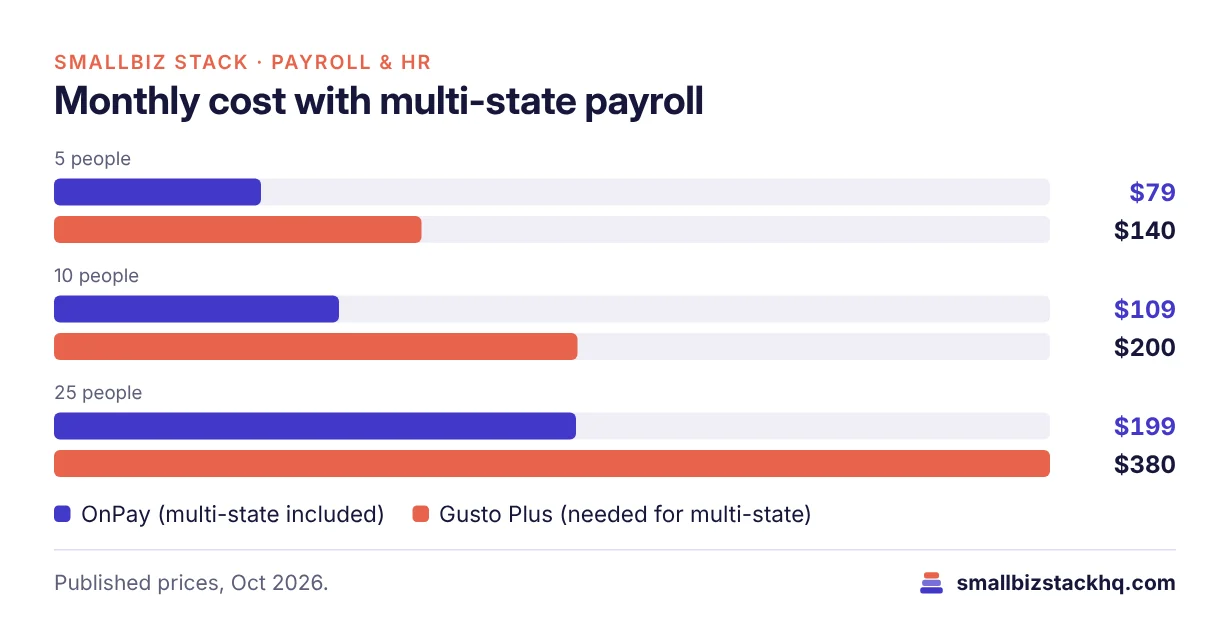
For a one-state team that only needs payroll, the two cost exactly the same. The moment you have an employee in a second state, OnPay is far cheaper, because Gusto requires Plus. If you also want time tracking, OnPay with its time tracking add-on still undercuts Gusto Plus at every team size above.
Features compared
Payroll and taxes
Both run full-service payroll with automatic federal, state and local tax filings, direct deposit and year-end forms. Both allow unlimited pay runs, which matters if you pay bonuses or off-cycle checks.
Multi-state
OnPay includes multi-state payroll in its single plan. Gusto Simple is one state only, so remote teams need Gusto Plus.
HR and onboarding
OnPay’s HR add-on adds HR tools for a small monthly fee, and it offers compliance resources and live HR support as further add-ons. Gusto’s Premium plan bundles HR guidance with a dedicated account partner, which is more hands-on but much more expensive per person.
Support
OnPay includes phone, chat and email support on its only plan. Gusto’s Simple and Plus plans come with basic support, and Premium adds a dedicated partner.
Ecosystem and ease of use
Gusto is the bigger, better-known platform with a polished employee app and many integrations. OnPay is smaller but well regarded for its straightforward setup and support.
Pros and cons
OnPay
Pros
- One plan with multi-state payroll included
- Cheapest option for remote or multi-state teams
- Phone support for everyone
- Pay only for the add-ons you use
Cons
- Smaller ecosystem than Gusto
- HR and time tracking cost extra
- Fewer advanced HR features
Gusto
Pros
- Polished software and employee experience
- Time tracking included from Plus
- Strong HR guidance on Premium
Cons
- Entry plan limited to one state
- Per-person fees rise quickly on higher plans
- Basic support on lower plans
Which should you choose?
Choose OnPay if you want the lowest price for full-service payroll, especially with employees in more than one state, and you like having phone support without paying for a premium tier.
Choose Gusto if you value its software, integrations and employee experience, or want HR guidance from a dedicated partner and are willing to pay for Premium.
Three real-world scenarios
A landscaping company with 6 seasonal workers in one state. It needs basic payroll and nothing else. OnPay and Gusto Simple both cost $49 + $36 = $85 a month, so the decision comes down to support and software preference. OnPay includes phone support on its only plan, which matters to an owner who isn’t at a desk.
A marketing agency with 10 remote employees in four states. Gusto requires Plus for multi-state payroll: $80 + $120 = $200 a month. OnPay costs $49 + $60 = $109 a month with multi-state included. Over a year, OnPay saves the agency $1,092.
A clinic with 15 hourly staff who need time tracking and HR documents. OnPay with its bundled HR and time tracking add-on costs $49 + $90 for payroll plus $81 + $60 for the bundle, about $280 a month. Gusto Plus costs $80 + $180 = $260 and includes time tracking but not Premium’s HR guidance. The two are close, so the clinic should compare the HR features it will actually use.
Questions to ask before you sign up
- Will you ever have employees in more than one state? If yes, OnPay’s single plan is likely cheaper.
- Do you need time tracking now or later? Gusto includes it from Plus; OnPay charges for it as an add-on.
- How do you prefer to get help? OnPay includes phone, chat and email support for everyone.
- Which integrations do you rely on? Check both integration lists for your accounting, time clock and benefits tools.
- Who will run payroll if you’re away? Both allow additional admins; confirm permissions before you commit.
Frequently asked questions
Does OnPay handle contractors?
Yes. OnPay pays both employees and contractors and issues 1099s at year end, with contractors counted as workers for pricing.
Is OnPay cheaper than Gusto?
For one-state payroll they cost the same. For multi-state teams, OnPay is cheaper because Gusto requires its Plus plan.
Does OnPay have a free trial?
OnPay advertises a free first month. Check the terms when you sign up.
Can I switch from Gusto to OnPay mid-year?
Yes. You’ll need year-to-date payroll totals so W-2s are correct. Switching at the start of a quarter keeps tax filings simpler.
Does OnPay integrate with QuickBooks and Xero?
OnPay integrates with popular accounting tools including QuickBooks and Xero. Confirm the current list on OnPay’s integrations page.
The bottom line
OnPay gives you more payroll for the money, especially for multi-state teams. Gusto is the more polished platform with better HR depth at the top end. Price your exact team on both sites before you decide.
Related: Gusto vs ADP RUN · Gusto vs QuickBooks Payroll