
Last updated: October 2026 | Prices checked against Mailchimp’s and Kit’s official pricing pages
Disclosure: SmallBiz Stack is reader-supported. Some links on this site may be affiliate links, which means we may earn a commission at no extra cost to you. This never changes our verdicts. Prices change often, so confirm the current rate on the vendor’s site before you sign up.
Mailchimp and Kit (the company formerly called ConvertKit) both send email newsletters and automated sequences, but they are built for different people. Mailchimp is a general marketing platform aimed at small businesses and online stores, with design templates, audience segmentation and e-commerce integrations. Kit is built for creators: writers, coaches and course sellers who grow an audience and sell digital products to it.
The biggest practical difference in 2026 is the free plan. Kit’s free plan covers up to 10,000 subscribers. Mailchimp’s free plan stops at 250 contacts.
Mailchimp vs Kit at a glance
| Mailchimp | Kit | |
|---|---|---|
| Free plan | Up to 250 contacts, 500 sends a month | Up to 10,000 subscribers |
| Automation on free plan | No | No (no visual automations or sequences) |
| Cheapest paid plan | Essentials, from $13/mo | Creator, $33/mo for 1,000 subscribers |
| Full automation | Standard, from $20/mo | Creator and Pro |
| Users | 1, 3, 5 or unlimited seats by plan | 1 (Free), 2 (Creator), unlimited (Pro) |
| Best for | Small businesses and online stores | Creators, newsletters, digital products |
Mailchimp pricing in 2026
Mailchimp prices rise with the number of contacts in your account. The figures below are starting prices at the lowest contact tier.
| Mailchimp plan | Starting price | Monthly sends | Seats | Automation |
|---|---|---|---|---|
| Free | $0 | 500 a month (250 a day), up to 250 contacts | 1 | Not included |
| Essentials | From $13/mo | 10× your contact count | 3 | Up to 4 flow steps |
| Standard | From $20/mo | 12× your contact count | 5 | Up to 200 flows |
| Premium | From $350/mo | 15× your contact count | Unlimited | Up to 200 flows |
Read the fine print on contacts. Mailchimp counts every contact stored in your account, so cleaning out unsubscribed and inactive contacts keeps you in a cheaper tier. Promotional prices may apply to your first 12 months.
Kit pricing in 2026
Kit’s prices also rise with list size. These are the prices for 1,000 subscribers.
| Kit plan | Monthly price (1,000 subscribers) | Annual billing | Automations and sequences | Users |
|---|---|---|---|---|
| Newsletter (Free) | $0, up to 10,000 subscribers | n/a | Not included | 1 |
| Creator | $33/mo | $390/yr (about 17% off) | Unlimited visual automations and sequences | 2 |
| Pro | $66/mo | About 17% off annually; first-year promos may apply | Unlimited, plus advanced features | Unlimited |
Kit’s free plan lets you build a big list and send broadcasts, but sequences and visual automations need a paid plan. That is the main reason creators upgrade.
Cost example: 1,000 subscribers
| Need | Mailchimp | Kit |
|---|---|---|
| Send a weekly newsletter, no automation | Essentials (from $13/mo; free plan caps at 250 contacts) | Free |
| Welcome sequence and automated follow-up | Standard (from $20/mo, price rises with contacts) | Creator, $33/mo |
| Team of 3+ people | Essentials (3 seats) or Standard (5 seats) | Pro, $66/mo |
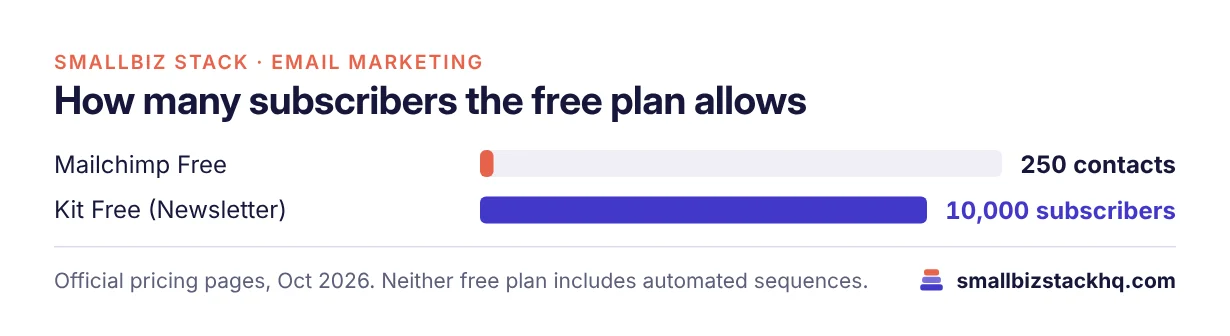
If you just want to send a newsletter to 1,000 people, Kit is free and Mailchimp is not. Once you need automation, Mailchimp’s Standard plan can be cheaper at small list sizes, but check its price at your exact contact count before comparing.
Features compared
Email design
Mailchimp is the stronger designer. It has a large template library, a drag-and-drop builder and brand kits, which suits stores and businesses that send image-rich promotional emails. Kit deliberately keeps emails simple and text-focused, which works well for newsletters and personal-feeling messages.
Automation
Mailchimp’s Essentials plan limits flows to four steps; Standard unlocks up to 200 flows with more complex journeys, such as abandoned-cart emails for online stores. Kit’s visual automation builder is known for being easy to use and is included in Creator and Pro without a cap on automations or sequences.
Audience management
Mailchimp organizes contacts into audiences with tags, groups and segments. Because billing is by contact, keeping one clean audience is cheaper than several. Kit uses a single subscriber list with tags and segments, which is simpler for creators who sell several products.
Selling and e-commerce
Mailchimp integrates with many e-commerce platforms and is built for promotional campaigns and product recommendations. Kit focuses on creators selling digital products, paid newsletters and tips directly to their audience.
Team access
Mailchimp includes 3 seats on Essentials and 5 on Standard. Kit’s Creator plan includes 2 users, and Pro is unlimited. A small business with several people writing campaigns may find Mailchimp’s seats more generous at the lower tiers.
Pros and cons
Mailchimp
Pros
- Strong templates and design tools
- Good fit for online stores and promotional campaigns
- Low starting price for paid plans
- More seats on lower tiers
Cons
- Free plan limited to 250 contacts
- Price climbs as your contact count grows
- Essentials automation is very limited
Kit
Pros
- Free plan up to 10,000 subscribers
- Easy visual automations on paid plans
- Built-in tools for selling digital products and paid newsletters
Cons
- No automations or sequences on the free plan
- Fewer design options for image-heavy emails
- Creator plan limited to 2 users
Which should you choose?
Choose Mailchimp if you run a store or local business, you send promotional emails with images and product blocks, and you have a few people on your team who need access.
Choose Kit if you are building an audience around your expertise, you want to send a newsletter for free while your list grows, or you sell courses, coaching or digital products.
Frequently asked questions
Is Kit the same as ConvertKit?
Yes. ConvertKit rebranded as Kit. The product, account and features carried over.
Which has the better free plan?
Kit, by a wide margin for list size: up to 10,000 subscribers versus Mailchimp’s 250 contacts. Neither free plan includes automated sequences.
Can I move my list from Mailchimp to Kit?
Yes. You can export contacts from Mailchimp as a CSV and import them into Kit (or the other way around). Keep records of how each contact subscribed so you stay compliant with anti-spam rules.
Do I need to pay for unsubscribed contacts in Mailchimp?
Mailchimp bills based on the contacts in your account, so archive or remove unsubscribed and inactive contacts regularly to avoid paying for them.
Which is better for a small business newsletter?
If your newsletter is simple and your list is under 10,000 people, Kit’s free plan covers it. If you want rich design and e-commerce features, Mailchimp is the better fit.
The bottom line
Mailchimp is the better all-round marketing tool for small businesses and online stores. Kit is the better home for creators, and its free plan is far more generous. Decide based on what you send: promotions to customers point to Mailchimp; newsletters and digital products point to Kit.
Related: if you sell online, read our Shopify vs WooCommerce comparison.