
Last updated: October 2026 | Prices checked against each vendor’s pricing page or, where noted, independent pricing reviews
Disclosure: SmallBiz Stack is reader-supported. Some links on this site may be affiliate links, which means we may earn a commission at no extra cost to you. This never changes our verdicts. Prices change often, so confirm the current rate on the vendor’s site before you sign up.
Email is still one of the cheapest and most effective ways for a small business to bring customers back. The good news: you don’t need to spend much. Several tools offer genuinely useful free plans, and paid plans start under $20 a month. The catch is in the limits: how many contacts, how many emails, which features and whose logo appears in your emails.
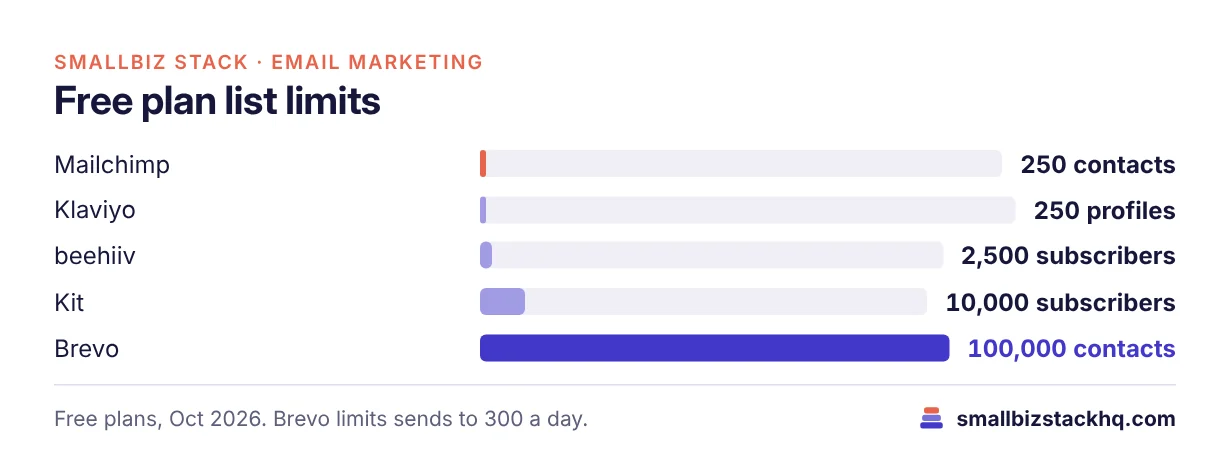
Free plans compared
| Tool | Free plan limit | Automation on free plan | Branding |
|---|---|---|---|
| Brevo | Up to 100,000 stored contacts, 300 emails a day | Limited | Brevo logo on emails |
| Kit | Up to 10,000 subscribers | No sequences or visual automations | Kit branding |
| beehiiv | Up to 2,500 subscribers | Limited | beehiiv branding |
| Mailchimp | Up to 250 contacts, 500 emails a month | No | Mailchimp branding |
| Klaviyo | 250 active profiles, 500 emails a month, 150 SMS credits | Yes (e-commerce flows) | Klaviyo branding |
| Constant Contact | No free plan (free trial) | — | — |
Cheapest paid plans
| Tool | Entry paid plan | Starting price | What you get |
|---|---|---|---|
| Brevo | Starter | From $9/mo | 5,000 emails a month, no daily cap |
| Constant Contact | Lite | $12/mo ($10.20 yearly) | 10× contacts in monthly sends, 1 user |
| Mailchimp | Essentials | From $13/mo | 10× contacts in sends, 3 seats |
| Brevo | Standard | From $18/mo | Automation, A/B testing, logo removed |
| Mailchimp | Standard | From $20/mo | Up to 200 automation flows |
| Klaviyo | From $20/mo | E-commerce flows and segmentation | |
| Kit | Creator | $33/mo (1,000 subscribers) | Unlimited automations and sequences |
| beehiiv | Lite | $49/mo (yearly) | Up to 100,000 subscribers, paid subscriptions, ad network |
Prices rise with list size on most tools; figures are starting prices at the lowest tier.
The best pick for each situation
Biggest free list: Brevo
Brevo’s free plan stores up to 100,000 contacts and sends 300 emails a day. If you have a large customer list that you email occasionally, it’s hard to beat, as long as you accept Brevo’s logo in your emails.
Best free newsletter: Kit
Kit’s free plan covers up to 10,000 subscribers for broadcasts. Upgrade to Creator for automated welcome sequences.
Cheapest automation: Brevo Standard or Mailchimp Standard
Both put real automation (welcome series, follow-ups) around $18–$20 a month at the smallest tiers.
Best for online stores: Klaviyo
Klaviyo’s free plan includes e-commerce flows for small lists, and its Shopify integration is excellent. It gets more expensive as your list grows.
Simplest for local businesses: Constant Contact
No free plan, but Lite at $12 a month is simple, and the 30-day money-back guarantee lowers the risk.
Cost example: 2,000 contacts, two emails a month
About 4,000 emails a month.
| Tool | Plan that fits | Approximate cost |
|---|---|---|
| Brevo | Free (300 a day is enough if you send in batches) or Starter | $0–$9/mo |
| Kit | Free (no automation) | $0 |
| Mailchimp | Essentials (price at 2,000 contacts) | Check calculator; above the $13 starting price |
| Constant Contact | Lite (price at 2,000 contacts) | Check calculator; above the $12 starting price |
For a small list sent a couple of times a month, a free plan from Brevo or Kit usually does the job.
Tips to keep costs down
- Clean your list. Contact-based tools (Mailchimp, Klaviyo) charge for every stored or active contact.
- Send less, better. Email-volume tools (Brevo) charge for sends.
- Pay yearly where discounts are offered.
- Start free, upgrade for automation. Most of the value comes from a welcome sequence and a few automated follow-ups.
- Avoid paying for features you don’t use, such as SMS or advanced reporting.
What to set up first (it’s free)
- A signup form on your website and in your shop or booking flow.
- A welcome email that thanks new subscribers and tells them what to expect.
- A simple monthly newsletter with one useful tip, one offer and one piece of news.
- Segments for customers versus prospects, so you can send relevant offers.
- Authentication of your sending domain (SPF and DKIM), which improves deliverability on any platform.
How to choose in two minutes
- Big list, occasional sends, tiny budget: Brevo Free.
- Writer or creator starting a newsletter: Kit Free.
- Online store: Klaviyo Free, then Klaviyo Email.
- Want polished design and automation under $25: Mailchimp Standard or Brevo Standard.
- Local business that wants simplicity: Constant Contact Lite.
- Paid newsletter with sponsors: beehiiv.
Frequently asked questions
What is the cheapest email marketing software?
For free, Brevo (largest list) and Kit (up to 10,000 subscribers) stand out. For paid plans, Brevo Starter from $9 a month is among the cheapest.
Is Mailchimp still free?
Yes, for up to 250 contacts and 500 emails a month, without automation.
Can I remove the logo on a free plan?
Generally no. Brevo removes its logo from the Standard plan (or with a paid add-on on Starter).
Which is best for a small business newsletter?
Kit for a simple free newsletter, Brevo for a large list on a budget, and Mailchimp if you want polished design tools.
The bottom line
You can run professional email marketing for free with Brevo or Kit, and add automation for about $20 a month with Brevo Standard or Mailchimp Standard. Choose based on your list size, how often you send and whether you sell online.
Related: Brevo vs Mailchimp · Mailchimp vs Kit · Klaviyo vs Mailchimp · beehiiv vs Substack vs Kit