
Last updated: October 2026 | Square prices checked on Square’s official pricing page; Toast prices checked on Toast’s official pricing page (Toast quotes card rates, hardware and contract terms individually)
Disclosure: SmallBiz Stack is reader-supported. Some links on this site may be affiliate links, which means we may earn a commission at no extra cost to you. This never changes our verdicts. Prices change often, so confirm the current rate on the vendor’s site before you sign up.
Square and Toast are two of the most common point-of-sale systems in American restaurants. Square started as a card reader for any small business and built a dedicated restaurant product on top. Toast was built from day one for restaurants only, with kitchen displays, handheld ordering and restaurant-specific reporting at its core.
The way they sell is just as different as the products. Square publishes its plans and processing rates. Toast publishes a starting price and quotes most of the rest after a sales call.
Square vs Toast at a glance
| Square for Restaurants | Toast | |
|---|---|---|
| Software plans | Free, Plus ($49/mo per location), Premium ($149/mo per location) | Starter Kit ($0/mo), Point of Sale (from $69/mo), custom plans |
| In-person card rate | 2.6% + 15¢ (Free), 2.5% + 15¢ (Plus), 2.4% + 15¢ (Premium) | Quoted; Toast advertises flat-rate processing but doesn’t publish the rate |
| Online card rate | 3.3% + 30¢ (Free), 2.9% + 30¢ (Plus and Premium) | Varies by plan and add-ons |
| Kitchen display (KDS) | $30/mo per device (Plus), $20 (Premium) | Hardware quoted; see Toast’s pricing page |
| Pricing published? | Yes | Partly; most plans are quoted |
| Contract | Month to month | Ask for contract length and termination fee in writing |
| Best for | Cafés, quick service, new restaurants, multi-use businesses | Full-service and high-volume restaurants that want an all-restaurant system |
Square for Restaurants pricing in 2026
| Square plan | Monthly per location | In-person rate | Online rate | Manually keyed | KDS app | Kiosk app |
|---|---|---|---|---|---|---|
| Free | $0 | 2.6% + 15¢ | 3.3% + 30¢ | 3.5% + 15¢ | Not available | Not available |
| Plus | $49 | 2.5% + 15¢ | 2.9% + 30¢ | 3.5% + 15¢ | $30/mo per device | $50/mo per device |
| Premium | $149 | 2.4% + 15¢ | 2.9% + 30¢ | 3.5% + 15¢ | $20/mo per device | $30/mo per device |
Square hardware starts at $59 for a basic reader, and you can buy registers, terminals and kitchen printers outright.
Toast pricing in 2026
Toast’s website lists pricing “starting at $0/month” and asks you to get a quote for the rest. Toast’s pricing page lists these plans:
| Toast plan | Monthly software | Card processing |
|---|---|---|
| Starter Kit | $0 | Quoted; ask for in-person, online and keyed rates |
| Point of Sale | From $69 | Quoted (flat rate) |
| Build Your Own | Custom quote | Custom quote |
Toast doesn’t publish hardware prices: its hardware page says hardware starts at $0 for the first device, with software and processing fees on top, and quotes the rest. Toast offers 0% hardware financing to approved customers, and its software subscription includes 24/7 support (Toast Care).
Because Toast quotes individually, ask for every rate in writing: the card rate for in-person, online and keyed transactions, monthly software and hardware fees, contract length and the early termination fee.
Cost example: a restaurant doing $40,000 a month in card sales
Assume an average ticket of $35, which is about 1,143 card transactions a month, all in person.
| Setup | Software | Processing | Estimated monthly total |
|---|---|---|---|
| Square Plus | $49 | 2.5% × $40,000 + 15¢ × 1,143 = $1,171 | About $1,220 |
| Square Premium | $149 | 2.4% × $40,000 + 15¢ × 1,143 = $1,131 | About $1,280 |
| Toast Point of Sale | $69 | Your quoted rate × $40,000 + fixed fee × 1,143 | Matches Square Plus at about 2.45% + 15¢ |
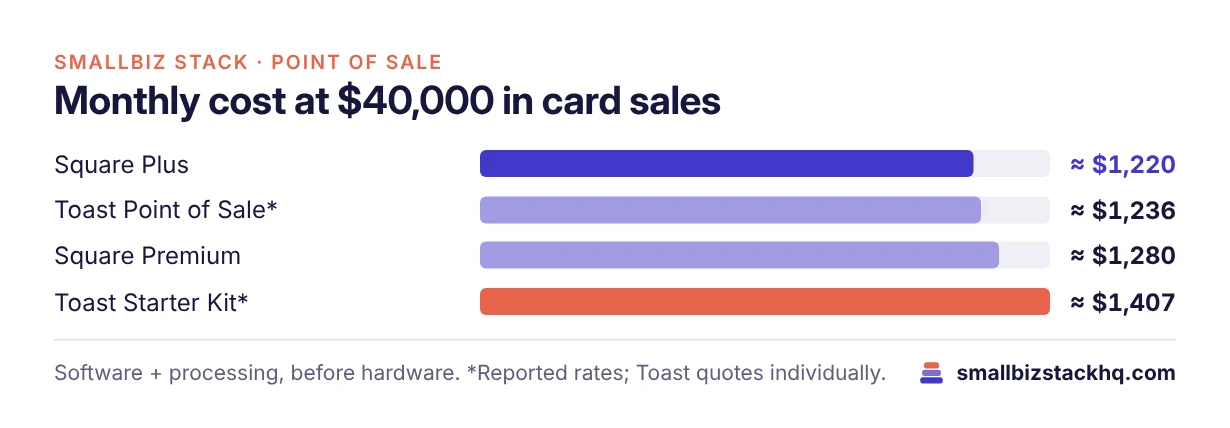
Before hardware and kitchen displays, Toast’s paid plan matches Square Plus at this volume only with a quoted rate of about 2.45% + 15¢ or lower ($1,220 minus $69 software and $171 in fixed fees leaves $980, or 2.45% of $40,000). Toast’s no-monthly-fee Starter Kit costs more than Square Plus if its quoted rate is above about 2.62% + 15¢. Square Premium only pays off at higher volume: its lower rate saves $40 per $40,000, so you need about $100,000 a month in card sales before the extra $100 subscription breaks even.
Features compared
Built for restaurants
Toast’s whole product is restaurant software: table management, coursing, menu modifiers, kitchen routing, handheld ordering at the table and restaurant-focused reporting. Square for Restaurants covers the same core needs and is strong for counter service, cafés and quick-service spots, and it shares a platform with Square’s retail and appointments tools.
Kitchen displays
Square’s KDS app costs $30 a month per device on Plus and $20 on Premium; it isn’t available on the Free plan. Toast sells dedicated kitchen display hardware with a monthly fee per screen.
Online ordering
Both offer online ordering. Square’s online rate is 2.9% + 30¢ on Plus and Premium. Toast doesn’t publish its online card rates, so ask how online orders are priced on the plan you are quoted.
Payroll and team management
Square sells payroll and team management separately. Toast offers a POS and payroll bundle starting at $69 a month plus $9 per employee.
Contracts and flexibility
Square plans are month to month, so you can change plans or leave without a penalty. Toast doesn’t publish its contract terms, so ask for the length and any early termination fee in writing. For a new restaurant, that flexibility is worth a lot.
Pros and cons
Square for Restaurants
Pros
- Transparent published pricing
- No long-term contract
- Free plan to get started
- Simple setup and affordable hardware
Cons
- KDS and kiosk cost extra per device
- Fewer full-service features than Toast
- Higher online rate on the Free plan
Toast
Pros
- Built only for restaurants, with deep full-service features
- Durable handheld and kitchen hardware
- 24/7 support included
- Hardware financing available
Cons
- Most pricing is quote-only
- Contract terms aren’t published
- Card rates aren’t published
Which should you choose?
Choose Square if you run a café, quick-service restaurant, food truck or a new place where flexibility matters, or you want published prices and no contract.
Choose Toast if you run a full-service or high-volume restaurant, you want handheld ordering and deep kitchen workflows, and you are comfortable negotiating a contract with clear rates in writing.
Frequently asked questions
Is Toast more expensive than Square?
Not necessarily on software and processing. At $40,000 a month in card sales, Toast’s paid plan costs about the same as Square Plus before hardware if your quoted rate is about 2.45% + 15¢ or lower. Toast can cost more once you add hardware subscriptions and if your contract carries higher rates for online orders.
Does Square require a contract?
No. Square for Restaurants plans are month to month.
Can I use Toast without paying a monthly fee?
Yes. The Starter Kit has no monthly software fee, but ask for its card processing rate in writing, since a higher rate can cost more than a monthly fee once you process real volume.
Which is better for a coffee shop?
Square, for most coffee shops. Its Free and Plus plans, fast counter checkout and month-to-month terms fit quick-service businesses well.
Can I bring my own payment processor?
Neither is designed for that. Both process card payments themselves as part of the service, which is why comparing card rates is essential.
The bottom line
Square is the flexible, transparent choice, and for most cafés and quick-service restaurants it is the safer bet. Toast is the more specialized restaurant system and makes sense for busy full-service restaurants, as long as you get every fee and contract term in writing before you sign.
Related: setting up payroll for your staff? See Gusto vs ADP RUN. Need accounting software? Read QuickBooks Online vs Xero.
Related guides
These comparisons connect directly to this topic:
- Square vs Clover (2026): Fees, Hardware and Contracts for Small Businesses
- Best Payroll Software for Restaurants (2026): Square, Toast, Gusto and OnPay
- Best POS System for Coffee Shops (2026): Square vs Toast vs Clover
- Best POS for Small Retail Stores (2026): Square vs Lightspeed Retail
Sources and further reading
Plan prices, limits and features in this comparison were checked against the vendors’ own pages listed below. Software companies change plans and prices often, so confirm the current price on the vendor page before you buy. How we research and update articles is explained in our editorial policy.