
Last updated: October 2026 | Prices checked against Square’s, Gusto’s and OnPay’s official pricing pages; Toast Payroll figures from independent pricing reviews
Disclosure: SmallBiz Stack is reader-supported. Some links on this site may be affiliate links, which means we may earn a commission at no extra cost to you. This never changes our verdicts. Prices change often, so confirm the current rate on the vendor’s site before you sign up.
Restaurant payroll is harder than office payroll. Most staff are hourly, many earn tips, overtime is common, and turnover means constant onboarding. The best restaurant payroll tools pull timecards and tips straight from your POS, so managers don’t re-enter hours every pay period.
The options at a glance
| Square Payroll | Toast Payroll | Gusto | OnPay | |
|---|---|---|---|---|
| Price | $35/mo + $6 per person | About $90/mo + $9 per employee (reported) | $49–$180/mo + $6–$22 per person | $49/mo + $6 per worker |
| POS timecard import | Yes (Square POS) | Yes (Toast POS) | Through integrations | Through integrations |
| Tip tracking | Direct-tip tracking and import | Built into Toast | Supported | Supported |
| Overtime calculations | Yes | Yes | Yes | Yes |
| Multi-state | Check terms | Check terms | Plus and Premium | Included |
| Best for | Restaurants on Square POS | Restaurants on Toast POS | Restaurants wanting standalone payroll with HR | Budget-conscious restaurants needing phone support |
Cost for a 15-person restaurant team
| Option | Calculation | Monthly cost |
|---|---|---|
| Square Payroll | $35 + 15 × $6 | $125 |
| OnPay | $49 + 15 × $6 | $139 |
| Gusto Simple (one state) | $49 + 15 × $6 | $139 |
| Gusto Plus | $80 + 15 × $12 | $260 |
| Toast Payroll (reported) | $90 + 15 × $9 | About $225 |
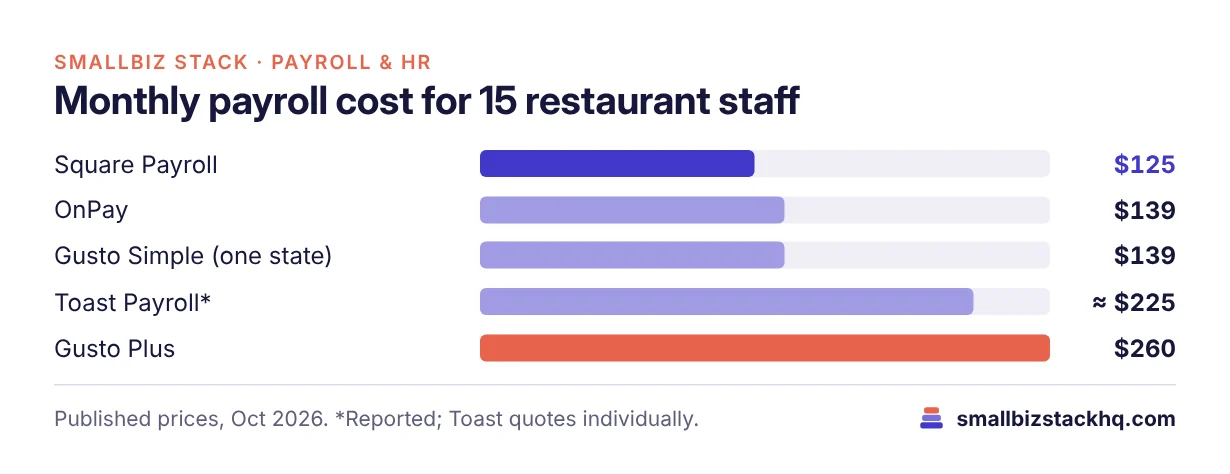
Toast has advertised a lower promotional price on its website; ask for your quote.
The options
Square Payroll
If your restaurant runs on Square POS, Square Payroll is the natural fit: $35 a month plus $6 per person paid, with automatic federal and state tax filings, timecard import, direct-tip tracking and importing, overtime calculations and labor-cost reporting. A contractor-only plan costs $6 per person with no base fee.
Toast Payroll
For restaurants on Toast POS, Toast Payroll connects time clock, tips and payroll in one system. Independent reviews report a payroll bundle at about $90 a month plus $9 per employee, with a lower promotional price advertised on Toast’s site. Ask Toast for a written quote alongside your POS quote.
Gusto
Gusto’s Simple plan ($49 + $6 per person) covers payroll in one state with unlimited runs. Plus ($80 + $12) adds multi-state payroll, time tracking and next-day deposit; Premium adds HR guidance. Gusto integrates with many POS systems.
OnPay
OnPay’s single plan ($49 + $6 per worker) includes multi-state payroll, unlimited runs and phone support, with optional time tracking and HR add-ons. A strong value choice for independent restaurants.
What to look for in restaurant payroll
- Tip handling: The software should import cash and card tips and handle tip credits and reporting correctly for your state.
- POS integration: Importing timecards from your POS saves hours each pay period.
- Overtime: Automatic overtime calculations for hourly staff.
- Onboarding: Fast digital onboarding for seasonal hires.
- Labor cost reporting: Helps managers schedule against sales.
Three real-world scenarios
A café on Square POS with 8 staff. Square Payroll at $83 a month imports timecards and tips with no extra integration.
A full-service restaurant on Toast with 25 staff. Toast Payroll keeps tips, timecards and payroll in one platform; compare its quote with Gusto Plus.
An independent diner using a different POS. OnPay or Gusto Simple at $49 + $6 per worker, connected to the POS through an integration.
Questions to ask before you sign up
- Which POS do you use? Payroll from the same company usually integrates best.
- How are tips paid out? Check support for your tip pooling and tip credit setup.
- Do you have staff in more than one state? Gusto Simple is one state only.
- What’s the real per-person cost? Count everyone paid in a typical month, including part-timers.
- Who answers the phone when payroll goes wrong? Check support options.
Setting up restaurant payroll
- Register for state payroll accounts (withholding and unemployment insurance) if you haven’t already.
- Collect W-4s and state forms for every employee; digital onboarding speeds this up.
- Set pay rates and roles, including tipped and non-tipped positions.
- Connect your POS so timecards and tips import automatically.
- Decide on tip policies (pooling, tip-outs) and document them.
- Review the first two payrolls closely for overtime and tip accuracy.
Hidden costs to budget for
- Per-person fees on seasonal staff: Most providers charge for everyone paid in a month, including part-timers.
- Paper forms: Square charges $3 per mailed W-2 or 1099; digital delivery is included.
- Time tracking: Some providers charge extra for time tracking; others include it.
- Multi-state payroll: Gusto Simple covers one state only.
- Year-end corrections: Fixing tip or wage errors after year end can cost time and fees, so get it right early.
Frequently asked questions
What is the cheapest payroll for restaurants?
Among the options here, Square Payroll at $35 + $6 per person is the cheapest full-service choice for most team sizes.
Does payroll software handle tips?
Square Payroll includes direct-tip tracking and importing, and Toast Payroll handles tips within Toast. Gusto and OnPay support tips too; confirm your tip setup with each.
Should I use my POS company’s payroll?
Often, yes, because timecards and tips flow automatically. Compare the price with standalone options like OnPay and Gusto.
Is this tax advice?
No. Tip credits, tip pooling and overtime rules vary by state. Check with your accountant or state labor department.
The bottom line
If you use Square POS, start with Square Payroll. If you use Toast, get a Toast Payroll quote. Otherwise, OnPay and Gusto are strong standalone options at $49 plus $6 per worker.
Related: Gusto vs ADP RUN · OnPay vs Gusto · Square vs Toast