
Last updated: October 2026 | Prices checked against Zoho’s and HubSpot’s pricing pages and independent pricing trackers
Disclosure: SmallBiz Stack is reader-supported. Some links on this site may be affiliate links, which means we may earn a commission at no extra cost to you. This never changes our verdicts. Prices change often, so confirm the current rate on the vendor’s site before you sign up.
Zoho CRM and HubSpot are two of the most common CRMs for small businesses, and both offer a free plan to get started. Zoho is known for packing a lot of features into low per-user prices. HubSpot is known for ease of use and a platform that connects sales, marketing and service, with prices that climb steeply at the professional tier.
Zoho CRM vs HubSpot at a glance
| Zoho CRM | HubSpot Sales Hub | |
|---|---|---|
| Free plan | Up to 3 users | Up to 2 users |
| Entry paid plan | Standard, $14/user/mo (annual) | Starter, from $20/seat/mo (monthly billing) |
| Mid tier | Professional, $23/user/mo (annual) | Professional, $90/seat/mo (annual) |
| Onboarding fee | None listed | $1,500 on Professional |
| Workflows | From Standard | Up to 50 on Starter; 300 on Professional |
| Inventory and quotes (CPQ) | Professional | Quotes available; inventory not a core feature |
| Best for | Budget-conscious teams that want lots of features | Teams that want ease of use and marketing in one place |
Zoho CRM pricing in 2026
Zoho’s US prices below are per user per month when billed annually; monthly billing costs more.
| Zoho CRM edition | Price (annual billing) | Key additions |
|---|---|---|
| Free | $0, up to 3 users | Contacts, follow-up reminders, basic workflow automation, standard reports, mobile app |
| Standard | $14 | Workflows, cadences, dashboards, sales forecasting, multiple pipelines, email and calendar integrations |
| Professional | $23 | Sales process management (blueprints), inventory management, CPQ, unlimited reports, Google Ads integration |
| Enterprise | $40 | Zia AI, developer sandbox, territory and multi-team management, approval processes |
| Ultimate | $52 | Higher limits, consulting and migration help, custom AI/ML |
HubSpot Sales Hub pricing in 2026
| HubSpot plan | Price per seat per month | Onboarding | Notes |
|---|---|---|---|
| Free | $0, up to 2 users | None | Contact and deal tracking, 1-to-1 email with HubSpot branding |
| Starter | From $20 (monthly billing) | None | Up to 50 workflows, 15 pipelines |
| Professional | $90 (annual) / $100 (monthly) | $1,500 one-time | Sequences, 300 workflows, forecasting, custom reports |
| Enterprise | From $150 | $3,500 one-time | Advanced automation and team forecasting |
First-year cost for a 5-person sales team
| Setup | Calculation | First-year cost |
|---|---|---|
| Zoho CRM Standard (annual) | $14 × 5 × 12 | $840 |
| Zoho CRM Professional (annual) | $23 × 5 × 12 | $1,380 |
| HubSpot Starter (monthly billing) | $20 × 5 × 12 | $1,200 |
| HubSpot Professional (annual) | $90 × 5 × 12 + $1,500 | $6,900 |
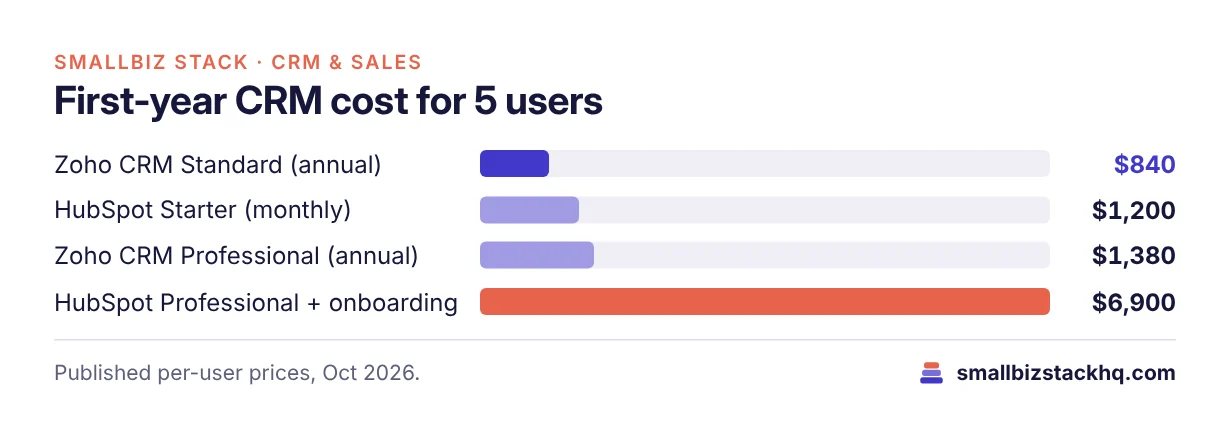
Zoho’s Professional edition, which includes sales process automation, inventory and quoting, costs about a fifth of HubSpot Professional in year one.
Features compared
Ease of use
HubSpot is widely regarded as one of the easiest CRMs to adopt, with a clean interface and helpful onboarding. Zoho CRM is highly configurable, which also means more settings to learn; many teams need some setup time or help to get the most out of it.
Automation
Zoho includes workflow automation from its Standard edition, plus cadences (automated follow-up sequences), and adds blueprints for guided sales processes on Professional. HubSpot Starter allows up to 50 workflows with restrictions; full workflows and sales sequences start on Professional.
Marketing and service
HubSpot’s big strength is its connected platform: Marketing Hub, Service Hub and content tools share the same CRM. Zoho offers its own suite (Zoho Campaigns, Zoho Desk and others, or the Zoho One bundle), which is broad and affordable but spread across separate apps.
Reporting and AI
Zoho includes sales forecasting from Standard and its Zia AI assistant on Enterprise and up. HubSpot Professional adds custom forecasting and up to 100 custom reports, with AI features that consume monthly credits.
Pros and cons
Zoho CRM
Pros
- Low per-user prices with automation from the first paid tier
- Free plan for up to 3 users
- Inventory and quoting on Professional
- No onboarding fees
Cons
- Steeper learning curve
- Interface less polished than HubSpot’s
- Best value comes from adopting the wider Zoho ecosystem
HubSpot
Pros
- Very easy to use
- Excellent free CRM
- Sales, marketing and service in one platform
Cons
- Expensive jump to Professional
- Required onboarding fees on higher tiers
- Credits and add-ons make total cost harder to predict
Which should you choose?
Choose Zoho CRM if price matters, you want sales automation without paying enterprise rates, or you need inventory and quotes inside your CRM.
Choose HubSpot if ease of use and adoption matter most, you plan to run marketing from the same platform, and your budget can absorb the Professional tier when you need it.
Three real-world scenarios
A two-person consultancy. The founders want to track leads and follow-ups without paying anything yet. HubSpot Free (2 users) and Zoho CRM Free (3 users) both cover them. HubSpot is quicker to set up; Zoho leaves room for a third user.
A 5-person B2B sales team that needs automated follow-ups. They want sequences and stage-based automation. Zoho CRM Professional costs $1,380 for the first year. HubSpot Professional costs $6,900 including onboarding. Unless the team needs HubSpot’s marketing tools, Zoho is the better value.
A 10-person company running inbound marketing. They publish content, capture leads through forms and nurture them by email. HubSpot’s connected marketing and sales platform is worth the higher price here, because the alternative is stitching several Zoho apps together.
Questions to ask before you sign up
- Do you need marketing and sales in one system? If yes, HubSpot’s platform is the main reason to pay more.
- Who will set up the CRM? Zoho rewards some setup time; HubSpot is quicker out of the box.
- Which automations do you need on day one? Map them to Zoho Standard/Professional or HubSpot Starter/Professional.
- How many users in 12 months? Per-user pricing makes this the biggest driver of cost.
- What will you pay after year one? HubSpot’s onboarding fee is one-time; subscription costs continue.
Frequently asked questions
Which CRM has better mobile apps?
Both offer iOS and Android apps for viewing contacts, logging calls and updating deals on the go.
Is Zoho CRM free?
Yes, Zoho CRM has a free edition for up to 3 users with contacts, reminders, basic workflows and standard reports.
Is Zoho cheaper than HubSpot?
At comparable automation levels, yes, by a wide margin. Zoho Professional costs $23 per user per month on annual billing, while HubSpot Professional costs $90 per seat plus a $1,500 onboarding fee.
Can I migrate from HubSpot to Zoho CRM?
Yes. Zoho offers migration tools and, on the Ultimate edition, migration assistance. Export contacts, companies and deals from HubSpot as CSV files to start.
Which is better for a solo business?
HubSpot Free is the simplest place to start. Zoho Free is also strong and allows up to 3 users.
The bottom line
Zoho CRM is the better value for small teams that want automation on a budget. HubSpot is the easier, more connected platform, but its useful automation costs far more. Try both free plans with your real pipeline before upgrading.
Related: Pipedrive vs HubSpot · monday CRM vs Pipedrive