
Last updated: October 2026 | Prices checked against the official QuickBooks and Xero US pricing pages
Disclosure: SmallBiz Stack is reader-supported. Some links on this site may be affiliate links, which means we may earn a commission at no extra cost to you. This never changes our verdicts. Prices change often, so confirm the current rate on the vendor’s site before you sign up.
QuickBooks Online and Xero are the two cloud accounting tools most US small businesses end up choosing between. Both connect to your bank, send invoices, pay bills and produce the reports your accountant needs at tax time. Where they differ is price, how many people can log in, what is included at each tier and how easy it is to find an accountant who knows the software.
This is our full comparison: every plan and price as of October 2026, the limits that catch people out, add-on costs, and a side-by-side cost example for three common types of business.
QuickBooks Online vs Xero at a glance
| QuickBooks Online | Xero | |
|---|---|---|
| Paid plans (regular price) | $38, $85, $140, $340 per month | $27, $59, $97 per month |
| Free plan | Yes, very limited | No |
| Users | 1, 3, 5 or 25 depending on plan | No per-user fees |
| Intro discount | 50% off for 3 months (when checked) | 90% off for 6 months (offer ends Nov. 2, 2026) |
| Inventory | Plus and Advanced | Add-on (Inventory Plus) |
| Project tracking | Plus and Advanced | Established plan |
| Multi-currency | Varies by plan | Established plan |
| Payroll | QuickBooks Payroll (sold separately) | Gusto integration, $36/mo + $6 per person |
| Best for | Businesses that want the most familiar US option | Cost-conscious teams that need several users |
QuickBooks Online plans and pricing
QuickBooks Online now has five tiers, including a free one.
| QuickBooks plan | Regular price | Users | What it adds |
|---|---|---|---|
| Free | $0 | 1 | Income and expense tracking, 2 invoices a month, a profit and loss report, 1 bank connection. No mobile app or integrations |
| Simple Start | $38/mo | 1 (+2 accountants) | Real-time profit and loss, automated bookkeeping, bill pay with free ACH up to a monthly allotment |
| Essentials | $85/mo | 3 (+2 accountants) | Enhanced reports, custom metrics, adding employee time to invoices, website lead forms |
| Plus | $140/mo | 5 (+2 accountants) | Budgets, project profitability, inventory tracking, classes and locations (up to 40) |
| Advanced | $340/mo | 25 (+3 accountants) | Unlimited classes and locations, automated workflows, batch invoices, user permissions, Excel sync, priority support |
When we checked, every paid plan was 50% off for the first three months, and a 30-day free trial was available instead. The free plan is useful for a side hustle, but its two-invoices-a-month limit and lack of a mobile app mean most real businesses outgrow it quickly.
Xero plans and pricing
Xero’s US lineup has three plans, and none of them charge per user.
| Xero plan | Regular price | What’s included |
|---|---|---|
| Early | $27/mo | Quotes and 20 invoices a month, 5 bills a month, 30-day cash flow forecast, basic graphs. Auto-reconcile is a $5/mo add-on |
| Growing | $59/mo | Unlimited invoices and quotes, automated bill entry, 60-day forecast, 3 budgets, custom dashboards, auto-reconcile included |
| Established | $97/mo | Everything in Growing, plus multi-currency, project time and cost tracking, expense and mileage claims, KPIs, 180-day forecast, international bill payments |
When we checked, Xero was offering new US customers 90% off the base plan for the first six months, an offer ending November 2, 2026. Add-ons, usage and payment fees were excluded from the discount.
Watch the Early plan’s limits. Twenty invoices and five bills a month is enough for a freelancer, but a growing business will hit the cap fast. For most companies, Growing is the real starting point.
The price difference, plan for plan
Comparing like with like:
| Need | QuickBooks Online | Xero | Monthly difference |
|---|---|---|---|
| Basic bookkeeping, 1 user | Simple Start, $38 | Early, $27 | Xero $11 cheaper |
| Unlimited invoicing, a few users | Essentials, $85 | Growing, $59 | Xero $26 cheaper |
| Projects and inventory | Plus, $140 | Established, $97 + Inventory Plus | Xero cheaper before inventory add-on |
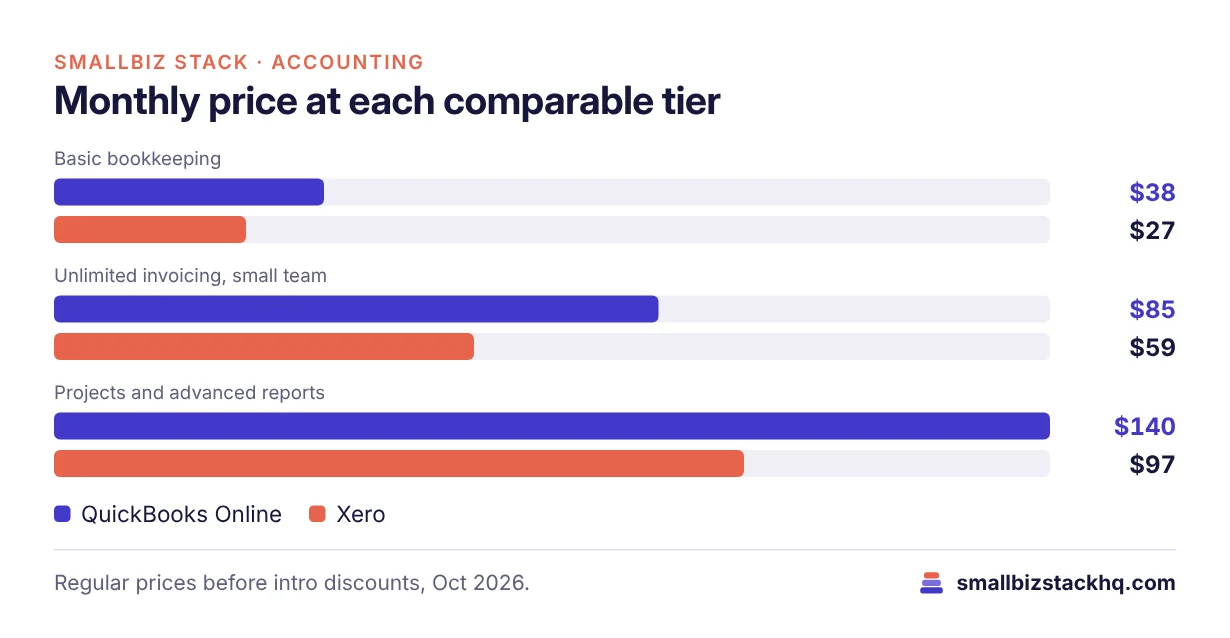
Over a year, Growing vs Essentials saves $312, and Established vs Plus saves $516 before any add-ons. Xero also doesn’t raise the price when you add users, while QuickBooks caps Essentials at three users and Plus at five.
Features compared
Invoicing and getting paid
Both let you send branded invoices, accept online payments and send reminders. QuickBooks Essentials lets you add employee time directly to invoices, which is useful for service businesses billing by the hour. Xero’s Early plan caps you at 20 invoices a month; Growing and Established remove the cap.
Bank feeds and reconciliation
Both pull transactions from your bank automatically and suggest matches. Xero’s auto-reconcile feature, which matches transactions for you, is included in Growing and Established and costs $5 a month on Early. QuickBooks markets automated bookkeeping from Simple Start.
Bills and expenses
QuickBooks includes bill pay with free standard ACH up to a monthly allotment, after which it charges per transaction. Xero includes free domestic ACH bill payments on every plan, with fees for cross-border payments. Xero’s expense and mileage claims are only on Established.
Reporting
QuickBooks reporting deepens with each tier: a profit and loss report on Free, enhanced reports on Essentials, comprehensive reports and budgets on Plus, and custom KPIs on Advanced. Xero includes budgets from Growing (three of them) and full KPIs and industry benchmarking on Established. Both are more than enough for a typical small business owner and their accountant.
Inventory
QuickBooks includes inventory tracking in Plus and Advanced. Xero sells Inventory Plus as an optional add-on for Growing and Established. If you sell physical products with more than a handful of SKUs, compare the full cost including the add-on.
Projects and job costing
QuickBooks Plus tracks project profitability; Advanced auto-creates projects and allocates costs. Xero’s project time and cost tracking is included in Established. For contractors and agencies, both work; QuickBooks has the edge on automation at the top tier, while Xero is cheaper for the core feature.
Users and access
This is Xero’s clearest advantage. Xero has no per-user license fees, so your bookkeeper, business partner and office manager can all log in at no extra cost. QuickBooks limits users by plan: one on Simple Start, three on Essentials, five on Plus and 25 on Advanced, plus a set number of accountant seats.
Payroll
Neither includes payroll in the base price. Xero’s payroll is powered by Gusto and costs $36 a month plus $6 per employee or contractor, and it is not eligible for Xero’s promotional discount. QuickBooks sells its own QuickBooks Payroll as an add-on during checkout; check the current price on Intuit’s site. If you already use Gusto, both QuickBooks and Xero connect to it. See our Gusto vs ADP comparison for more on payroll.
Finding an accountant
QuickBooks is the default in the US, and most US bookkeepers and CPAs know it well. Xero has a strong accountant network too, and is especially popular in the UK, Australia and New Zealand. If you already have an accountant, ask which they prefer; the time they save is worth more than the subscription difference.
Cost example: three businesses
| Business | QuickBooks Online | Xero |
|---|---|---|
| Freelance designer, 1 user, 10 invoices a month | Simple Start: $38/mo ($456/yr) | Early: $27/mo ($324/yr) |
| Marketing agency, 4 users, projects | Plus: $140/mo ($1,680/yr) | Established: $97/mo ($1,164/yr) |
| Retail shop, 2 users, inventory, payroll for 6 | Plus + QuickBooks Payroll | Growing $59 + Inventory Plus + Gusto payroll $72/mo |
Regular prices, before introductory discounts. Payroll for 6 on Xero: $36 + (6 × $6) = $72 a month.
The agency is where the difference is clearest: four users would push them onto QuickBooks Plus anyway, and Xero’s Established plan covers projects for $43 a month less.
Pros and cons
QuickBooks Online
Pros
- The most widely used option among US accountants
- Free plan for very small side businesses
- Inventory included in Plus
- Advanced tier for growing companies with automation and permissions
Cons
- More expensive at every comparable tier
- User limits on every plan
- Free plan has no mobile app and only 2 invoices a month
Xero
Pros
- Cheaper at every comparable tier
- No per-user fees
- Free domestic ACH bill payments
- Multi-currency and projects included in Established
Cons
- Early plan caps invoices at 20 and bills at 5 a month
- Inventory is an add-on
- Fewer US accountants specialize in it
Which should you choose?
Choose QuickBooks Online if your accountant uses it, you sell inventory and want it included, or you want an upgrade path to a more advanced tier with workflow automation as you grow.
Choose Xero if you need several people to log in, you want the lowest price for unlimited invoicing, or you work with international clients and need multi-currency without paying for a top-tier plan.
For a solo freelancer, either works; Xero Early is cheaper if you stay under 20 invoices a month. For a team, Xero’s unlimited users usually decide it, unless your accountant insists on QuickBooks.
Three-year cost of ownership
Software is a multi-year commitment, so compare the total over three years rather than the first month.
| Setup | Calculation | Three-year cost |
|---|---|---|
| QuickBooks Simple Start (1 user) | $19 × 3 + $38 × 33 | $1,311 |
| Xero Early | $2.70 × 6 + $27 × 30 | $826 |
| QuickBooks Essentials (3 users) | $42.50 × 3 + $85 × 33 | $2,933 |
| Xero Growing (any number of users) | $5.90 × 6 + $59 × 30 | $1,805 |
| QuickBooks Plus (5 users) | $70 × 3 + $140 × 33 | $4,830 |
| Xero Established (any number of users) | $9.70 × 6 + $97 × 30 | $2,968 |
Assumes the introductory discounts available when we checked (50% off for three months on QuickBooks; 90% off for six months on Xero, an offer ending November 2, 2026) and regular prices after that, with no price increases. Add-ons such as payroll and inventory are extra.
Over three years, a small team saves roughly $1,130 to $1,860 by choosing Xero over the comparable QuickBooks plan. That’s real money, but it can be outweighed if your accountant charges more to work in software they don’t know well.
Which is better by type of business
| Business type | Better fit | Why |
|---|---|---|
| Solo freelancer or consultant | Either; Xero Early if under 20 invoices a month | Both cover the basics; Xero is cheaper |
| Agency or professional services firm | Xero Established or QuickBooks Plus | Both track projects; Xero includes unlimited users |
| Retail or e-commerce with inventory | QuickBooks Plus | Inventory is built in rather than an add-on |
| Construction and trades | QuickBooks Plus | Project profitability, classes and a large US contractor ecosystem |
| Business with international clients | Xero Established | Multi-currency included at a lower price |
| Company with several departments | QuickBooks Advanced | Unlimited classes, permissions and approval workflows |
| Nonprofit or association | Either; ask your accountant | Both support classes or tracking categories for programs |
| Business with a bookkeeper and several managers | Xero | No per-user fees |
Integrations that matter
Both platforms connect to hundreds of apps. The integrations small businesses use most:
- Payroll: Gusto connects to both. QuickBooks also sells its own payroll bundles; Xero’s US payroll is powered by Gusto at $36 a month plus $6 per person.
- Payments: Both accept online invoice payments through built-in or connected processors such as Stripe.
- E-commerce: Shopify, WooCommerce and other platforms connect to both through apps that post sales and fees to your books.
- Expenses and receipts: Both capture receipts from a mobile app; Xero’s expense claims are included on Established.
- Point of sale: Square and other POS systems connect to both.
Before you choose, list the three or four tools you rely on and confirm each one connects well to the accounting software.
How to switch from QuickBooks to Xero (or the other way)
- Pick a clean start date, ideally the first day of a month, quarter or fiscal year.
- Ask your accountant whether to convert full history or just bring over opening balances.
- Export your data: chart of accounts, customers, vendors, items, open invoices and bills, and a trial balance as of the switch date.
- Use a conversion tool or service. Both companies and their partners offer migration tools for moving data between platforms.
- Reconnect your bank feeds in the new system and set the start date to avoid duplicates.
- Rebuild invoice templates, bank rules and integrations.
- Run both systems for one month if possible, and reconcile the first month carefully.
- Keep read-only access to your old system for reference and tax records.
Mobile apps and day-to-day use
Both offer mobile apps for iOS and Android that let you send invoices, capture receipts, check balances and reconcile on the go. QuickBooks’ free plan doesn’t include mobile app access, so you’ll need a paid plan if you work from your phone. Xero’s app is included on every plan.
Day to day, most owners spend their time in three places: the bank reconciliation screen, the invoices list and the dashboard. Try both free trials and spend 20 minutes reconciling a real week of transactions in each. That test tells you more than any feature list.
Security and data ownership
Both are established cloud platforms with bank-level encryption and two-factor authentication. Turn on two-factor authentication for every user, give your accountant their own login rather than sharing yours, and remove access promptly when someone leaves. With Xero’s unlimited users this is free; with QuickBooks, accountant seats don’t count against your user limit.
Your first month: a setup plan that works in either
Week 1: foundations. Enter your business details, fiscal year and sales tax settings. Connect your business bank and credit card accounts. Review the default chart of accounts and add only the categories you need, such as “Software subscriptions” or “Contract labor.” Fewer, clearer categories make reports easier to read.
Week 2: customers and invoicing. Import your customer list, create an invoice template with your logo and payment terms, and turn on online payments. Set up recurring invoices for retainer clients. If you bill by the hour, set up time tracking (QuickBooks Essentials and up, or Xero Established for project time).
Week 3: bills and expenses. Add your regular vendors and enter open bills. Snap photos of recent receipts with the mobile app. Create bank rules for transactions that repeat every month, such as rent, software and payroll, so they categorize themselves.
Week 4: reconcile and review. Reconcile your bank and card accounts to the statement balance. Run a profit and loss and a balance sheet, and share access with your accountant so they can review your setup before small mistakes become habits.
Accounting terms in plain English
- Chart of accounts: The list of categories your money is sorted into, such as income, expenses, assets and liabilities.
- Reconciliation: Checking that your books match your bank statement, transaction by transaction.
- Bank feed: An automatic connection that imports transactions from your bank into the software.
- Accounts receivable: Money customers owe you for invoices not yet paid.
- Accounts payable: Money you owe vendors for bills not yet paid.
- Profit and loss (P&L): A report showing income minus expenses over a period.
- Balance sheet: A snapshot of what the business owns and owes on a given date.
- Classes or tracking categories: Tags that split income and expenses by department, location or program.
- Cash vs accrual: Cash basis records income when paid; accrual records it when invoiced. Ask your accountant which you should use.
Red flags that you’ve picked the wrong plan
- You’re paying for extra users because a bookkeeper or partner needs access (consider Xero’s unlimited users).
- You’ve hit Xero Early’s 20-invoice cap two months in a row (move to Growing).
- You track inventory in a spreadsheet next to QuickBooks Simple Start (Plus may save time).
- You pay for QuickBooks Advanced but don’t use workflows or permissions (consider Plus).
- Your accountant spends hours each month fixing categories (a setup review will save money).
Frequently asked questions
Which is easier to learn?
Many owners find Xero’s interface cleaner and quicker to learn. QuickBooks has more US-specific help articles, community answers and trained bookkeepers, which makes it easier to get help.
Can I use QuickBooks Online and Xero for free?
QuickBooks has a permanent free plan with tight limits (2 invoices a month). Xero has no free plan but offers a free trial and large introductory discounts.
Is Xero easier than QuickBooks?
Both are designed for non-accountants. Many owners find Xero’s layout cleaner, while QuickBooks has more help content and US-specific guidance because of its size. Try both free trials with your real bank feed before deciding.
Can I switch from QuickBooks to Xero?
Yes. Xero and its partners offer conversion tools that move your chart of accounts, contacts and history. Switching at the start of a month or quarter keeps reconciliation clean.
Does Xero do payroll in the US?
Yes, through Gusto. It costs $36 a month plus $6 per employee or contractor.
Is there a free version of Xero?
No, but Xero offers a free trial and frequent introductory discounts. QuickBooks has a permanent free plan with tight limits.
Which is better for taxes?
Both produce the reports your accountant needs, such as profit and loss and balance sheet. Neither files your income tax return; your accountant or tax software does that.
The bottom line
Xero is the better value, especially for teams, thanks to lower prices and no per-user fees. QuickBooks Online is the safer choice if you want software that US accountants widely support, or you need inventory without an add-on. Use both free trials with a month of real transactions, and ask your accountant before you commit.
Related guides
These comparisons connect directly to this topic:
- Best Accounting Software for Etsy Sellers (2026): Wave vs QuickBooks vs Xero
- QuickBooks Online Plans Compared (2026): Simple Start vs Essentials vs Plus vs Advanced
- Gusto vs QuickBooks Payroll (2026): Which Is Better for Small Businesses?
- Wave vs QuickBooks (2026): Is Free Accounting Software Good Enough?
Sources and further reading
Plan prices, limits and features in this comparison were checked against the vendors’ own pages listed below. Software companies change plans and prices often, so confirm the current price on the vendor page before you buy. How we research and update articles is explained in our editorial policy.