
Last updated: October 2026 | Prices checked against the official QuickBooks Online pricing page
Disclosure: SmallBiz Stack is reader-supported. Some links on this site may be affiliate links, which means we may earn a commission at no extra cost to you. This never changes our verdicts. Prices change often, so confirm the current rate on the vendor’s site before you sign up.
QuickBooks Online is the most widely used accounting software among US small businesses, but choosing a plan isn’t obvious. Prices range from free to $340 a month, and the differences between tiers come down to a handful of features and user limits. This guide explains every plan, what it adds, and how to choose without overpaying.
QuickBooks Online plans at a glance
| Plan | Regular price | Users | Accountant seats | Best for |
|---|---|---|---|---|
| Free | $0 | 1 | None | Very occasional invoicing |
| Simple Start | $38/mo | 1 | 2 | Solo owners and freelancers |
| Essentials | $85/mo | 3 | 2 | Service businesses that bill time |
| Plus | $140/mo | 5 | 2 | Businesses with inventory or projects |
| Advanced | $340/mo | 25 | 3 | Growing companies needing automation and controls |
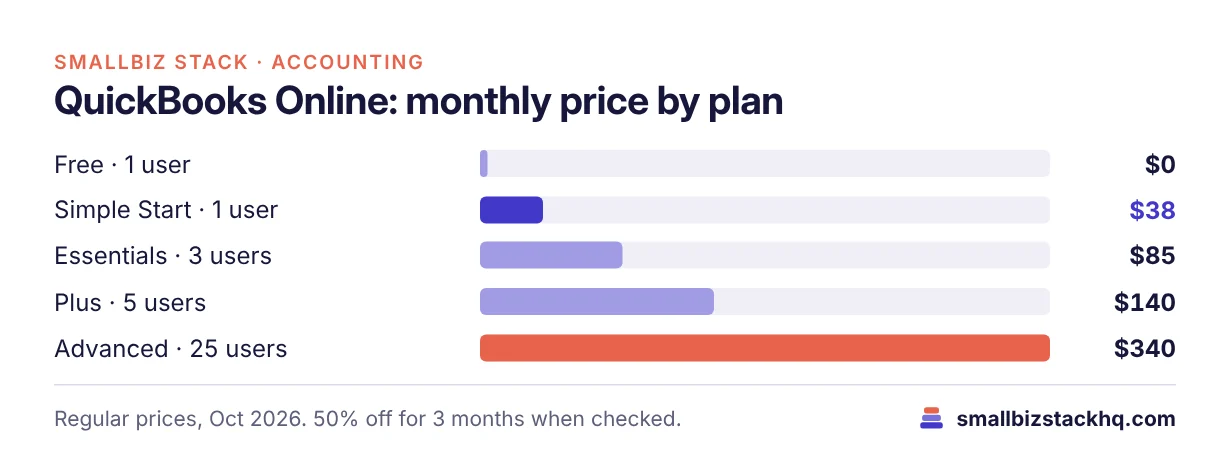
When we checked, paid plans were 50% off for the first three months: Simple Start $19, Essentials $42.50, Plus $70 and Advanced $170. A 30-day free trial was also available.
What each plan adds
Free
Tracks income and expenses, sends 2 invoices a month, runs the top 3 reports and connects 1 bank account. There’s no mobile app and no third-party integrations. It’s useful for a side project, but most businesses outgrow it quickly.
Simple Start ($38/month)
Adds real-time profit and loss reporting, automated bookkeeping and bill pay automation with free standard ACH up to a monthly allotment. One user plus two accountant seats. This is enough for most freelancers and one-person businesses.
Essentials ($85/month)
Adds enhanced reports, custom performance metrics, the ability to add employee time to invoices, and lead capture from website forms. Three users. Good for service businesses that bill by the hour or have a small office team.
Plus ($140/month)
Adds inventory tracking, project profitability, budget planning, comprehensive reports and classes and locations (up to 40). Five users. This is the plan for product sellers, contractors and agencies that need to know which jobs make money.
Advanced ($340/month)
Adds unlimited classes and locations, automated workflows, batch invoices and expenses, user permission controls, Excel data sync, bill approval workflows and priority support. 25 users. Built for companies with several departments or a finance person.
Cost over a year
| Plan | Regular yearly cost | Year one with 3 months at 50% off |
|---|---|---|
| Simple Start | $456 | $399 |
| Essentials | $1,020 | $892.50 |
| Plus | $1,680 | $1,470 |
| Advanced | $4,080 | $3,570 |
Year-one figures assume the 50%-off offer for three months, then regular price.
How to choose the right plan
- Count your users. One person: Simple Start. Up to three: Essentials. Up to five: Plus.
- Do you sell physical products? If you need inventory tracking, you need Plus.
- Do you need to know profit by job or project? Project profitability starts on Plus.
- Do you bill hours? Adding employee time to invoices starts on Essentials.
- Do you need departments, locations or approval workflows? Classes and locations start on Plus; unlimited classes and approvals need Advanced.
If none of those apply, Simple Start is enough, even for a business with substantial revenue.
Three real-world examples
A freelance bookkeeper with one client base and no employees. Simple Start covers invoicing, expenses and reports for $38 a month.
A 3-person IT consultancy billing hourly. Essentials lets the team add time to invoices and gives each person a login for $85 a month.
A furniture maker selling online and to retailers. Plus tracks inventory and cost of goods, and project profitability shows which custom orders make money, for $140 a month.
Add-ons to budget for
- Payroll: QuickBooks now sells payroll bundled with an accounting plan, starting at $88 a month plus $6.50 per employee with Simple Start. See Gusto vs QuickBooks Payroll.
- Payments: Card and ACH processing fees apply when customers pay invoices online.
- Bill pay: Standard ACH bill payments are free up to a monthly allotment, then a per-transaction fee applies.
Alternatives worth comparing
If QuickBooks feels expensive, compare Xero (no per-user fees), FreshBooks (strong for freelancers) and Wave (free plan with unlimited invoices).
Common mistakes when choosing a plan
- Paying for Plus “just in case.” If you don’t track inventory or projects today, Simple Start or Essentials will do, and upgrading later is easy.
- Ignoring user limits. Simple Start allows one user. If a partner or office manager needs their own login, you need Essentials.
- Forgetting the end of the discount. Budget for the regular price from month four.
- Using the Free plan for a real business. Two invoices a month and no mobile app will quickly get in your way.
- Not asking your accountant. Your accountant gets free seats on paid plans and may have a preference for how your books are set up.
Frequently asked questions
What happens to my data if I cancel?
Intuit keeps your data in read-only mode for a period after cancellation, so you can export reports. Check Intuit’s current policy before cancelling, and export everything you need first.
Can I upgrade or downgrade my QuickBooks plan later?
Yes. You can upgrade at any time. Downgrading is possible but may require reducing users or features first; check Intuit’s terms for your account.
Is QuickBooks Online Free really free?
Yes, but it allows only 2 invoices a month, 1 bank connection and 1 user, with no mobile app.
Which QuickBooks plan has inventory?
Plus and Advanced.
Does the 50% discount apply after three months?
No. After the introductory period, you pay the regular monthly price.
Do accountants need their own paid seat?
No. Paid plans include free accountant seats (two on Simple Start, Essentials and Plus; three on Advanced).
The bottom line
Most solo businesses only need Simple Start. Move to Essentials for more users or billable time, to Plus for inventory and projects, and to Advanced only when you need workflows, permissions and many users. Pick the plan for the features you’ll use this year, and upgrade when you actually need more.