
Last updated: October 2026 | Prices checked against Wave’s, QuickBooks’ and Xero’s official pricing pages and Etsy’s fee schedule
Disclosure: SmallBiz Stack is reader-supported. Some links on this site may be affiliate links, which means we may earn a commission at no extra cost to you. This never changes our verdicts. Prices change often, so confirm the current rate on the vendor’s site before you sign up.
Important: This is a software comparison, not tax advice. Ask a tax professional how to report your Etsy income.
Etsy makes selling easy, but bookkeeping less so. Your bank deposits from Etsy are net: Etsy has already taken listing fees, transaction fees, payment processing and sometimes Offsite Ads. If you only record deposits, you understate both your sales and your expenses. Good accounting software lets you record gross sales and fees separately, so your profit and your tax numbers are right.
The options at a glance
| Wave | QuickBooks Online | Xero | |
|---|---|---|---|
| Starting price | Free (Starter); Pro $19/mo | Simple Start $38/mo | Early $27/mo |
| Automatic bank feeds | Pro | Paid plans | All plans (auto-reconcile on Growing+) |
| Inventory tracking | No | Plus ($140/mo) | Add-on (Inventory Plus) |
| Users | Owner-focused | 1 on Simple Start | No per-user fees |
| Best for | Small shops with simple finances | Shops that want inventory and accountant familiarity | Shops with a partner or bookkeeper |
Etsy fees you need to record
According to Etsy’s fee schedule, US sellers pay:
- $0.20 listing fee per item (renewed every four months or when it sells)
- 6.5% transaction fee on the item price, shipping and gift wrap
- Payment processing on each order (varies by country)
- Offsite Ads fee of 15% (or 12% for shops with $10,000+ yearly sales) on attributed orders, capped at $100 per order
- Etsy Plus subscription of $10 a month, if you use it
Each of these is a business expense. Recording them separately shows you exactly what Etsy costs you.
How to record Etsy sales correctly
- Download your monthly Etsy statement or CSV from Shop Manager.
- Record gross sales (item price plus shipping charged to buyers) as income.
- Record each fee type as an expense: listing, transaction, processing, ads, subscription.
- Match the net deposit to your bank feed. Gross sales minus fees should equal what landed in your account.
- Track cost of goods (materials and supplies) so you know your true margin.
Many sellers make one summary entry per month using Etsy’s statement, which is accurate and quick. Apps that sync Etsy with accounting software can automate this for larger shops.
The options
Wave
Wave Starter is free with unlimited invoices and bookkeeping records; Wave Pro ($19 a month or $190 a year) adds automatic bank imports and receipt capture. For a small shop that records monthly Etsy summaries, Wave is the cheapest good option. It doesn’t track inventory.
QuickBooks Online
Simple Start ($38 a month) covers bookkeeping for a one-person shop. If you want inventory and cost of goods tracked automatically, you need Plus ($140 a month). QuickBooks is the most familiar option for US accountants.
Xero
Xero Early ($27 a month) works for small shops, but its 20-invoices and 5-bills monthly caps don’t matter much for Etsy sellers who record monthly summaries. Xero has no per-user fees, which helps if a partner or bookkeeper needs access.
Cost over a year
| Option | Yearly cost |
|---|---|
| Wave Starter | $0 |
| Wave Pro (yearly) | $190 |
| Xero Early | $324 |
| QuickBooks Simple Start | $456 |
| QuickBooks Plus (with inventory) | $1,680 |
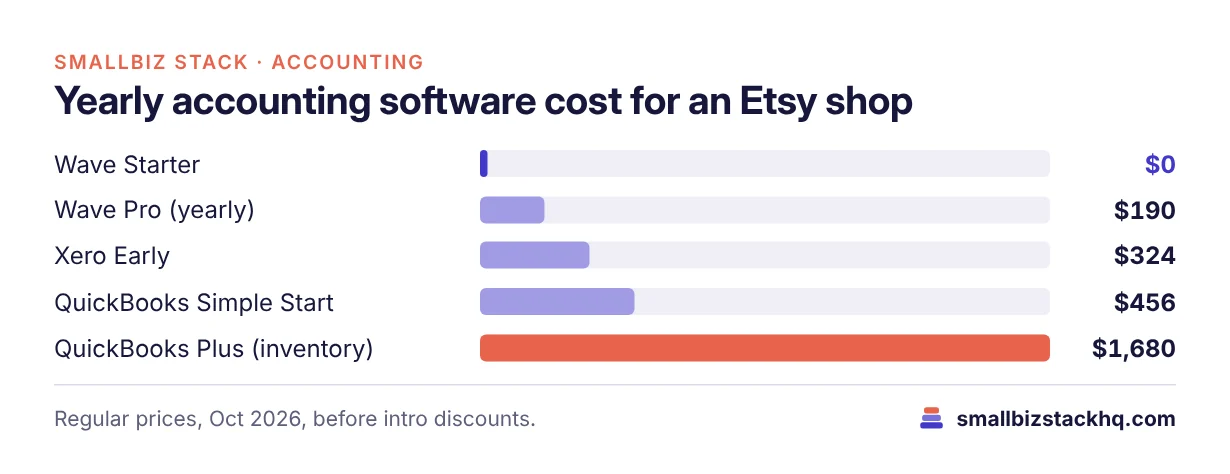
Regular prices before introductory discounts.
Three real-world scenarios
A jewelry maker selling $1,500 a month. Wave Starter with a monthly Etsy summary entry costs nothing and gives an accurate profit and loss.
A print shop selling $8,000 a month across Etsy and its own site. Wave Pro or Xero Early with bank feeds saves time; a sync app can help as order volume grows.
A candle brand with 300 SKUs and wholesale orders. QuickBooks Plus tracks inventory and cost of goods, which matters for margins and taxes at this size.
Questions to ask before you choose
- Do you need inventory tracked in the accounting software? If not, skip expensive plans.
- How many orders a month? High volume may justify a sync app.
- Do you sell on other channels too? Choose software that handles all of them.
- Who prepares your taxes? Ask which software they prefer.
- Do you collect sales tax? Etsy collects and remits sales tax in most US states; confirm how your accountant wants it recorded.
A simple monthly routine (30 minutes)
- Download your Etsy monthly statement.
- Enter one sales entry for gross sales and shipping collected.
- Enter one expense entry per fee type (listing, transaction, processing, ads, subscription).
- Confirm that gross sales minus fees equals your Etsy deposits for the month.
- Record material and supply purchases from your bank feed.
- Review your profit and loss: are fees and materials taking a bigger share than last month?
Common mistakes Etsy sellers make
- Recording only deposits, which hides fees and understates sales.
- Mixing personal and business spending in one account. A separate business bank account makes bookkeeping far easier.
- Forgetting shipping costs you paid for labels.
- Ignoring Offsite Ads fees, which can be 12–15% of attributed orders.
- Waiting until tax season to catch up on a year of statements.
Frequently asked questions
Do I need accounting software for an Etsy shop?
Not strictly, but it makes taxes easier and shows your real profit after fees. Even a free tool like Wave is far better than a pile of deposits.
Why don’t my Etsy deposits match my sales?
Because Etsy deducts fees before paying you. Record gross sales and fees separately.
Which software has inventory for Etsy sellers?
QuickBooks Online Plus includes inventory. Xero offers it as an add-on. Wave doesn’t track inventory.
Can accounting software connect directly to Etsy?
Some third-party apps sync Etsy orders and fees into QuickBooks or Xero. For small shops, a monthly summary entry is usually enough.
The bottom line
For most small Etsy shops, Wave is the best value, and a monthly summary from your Etsy statement keeps your books accurate. Move to QuickBooks Plus when you need inventory and cost tracking, or Xero if several people need access.
Related: Wave vs QuickBooks · Shopify vs Etsy · QuickBooks Online plans