
Last updated: October 2026 | Prices checked against Shopify’s and WooCommerce’s official pricing pages
Disclosure: SmallBiz Stack is reader-supported. Some links on this site may be affiliate links, which means we may earn a commission at no extra cost to you. This never changes our verdicts. Prices change often, so confirm the current rate on the vendor’s site before you sign up.
Shopify and WooCommerce run a huge share of small online stores, and they represent two different ways to sell online. Shopify is a hosted platform: you pay a monthly subscription and Shopify handles servers, security, updates and checkout. WooCommerce is a free, open-source plugin for WordPress: the software costs nothing, but you pay for hosting, extensions and your own time to maintain it.
The headline prices make WooCommerce look free and Shopify look expensive. As you will see below, once you add payment processing, the real monthly totals are often much closer than people expect.
Shopify vs WooCommerce at a glance
| Shopify | WooCommerce | |
|---|---|---|
| Software cost | $29–$299/mo billed yearly ($39–$399 monthly); Plus from $2,300/mo | Free |
| Hosting | Included | You pay: about $25–$350/mo for most stores (WooCommerce’s estimate) |
| Card processing | 2.9% + 30¢ (Basic) down to 2.5% + 30¢ (Advanced) with Shopify Payments | WooPayments about 2.5%–2.9% + 30¢; or any processor |
| Fee for using another payment provider | 2% (Basic), 1% (Grow), 0.6% (Advanced) | None |
| Extensions and apps | App Store, many with monthly fees | $29–$299 a year per extension (typical) |
| Maintenance | Handled by Shopify | You (or your developer/host) |
| Best for | Owners who want to sell, not manage software | Owners who want full control or already run WordPress |
Shopify pricing in 2026
| Shopify plan | Billed monthly | Billed yearly (per month) | Online card rate | 3rd-party payment fee | Staff accounts |
|---|---|---|---|---|---|
| Basic | $39 | $29 | 2.9% + 30¢ | 2% | None extra |
| Grow | $105 | $79 | 2.7% + 30¢ | 1% | 5 extra |
| Advanced | $399 | $299 | 2.5% + 30¢ | 0.6% | 15 extra |
| Plus | From $2,300 | n/a | 2.25% + 30¢ | 0.2% | Unlimited |
When we checked, Shopify was offering a short free trial followed by $1 a month for the first three months on most plans.
The 2% fee is the one to watch. If you use Shopify Payments, you pay only the card rate. If you use a different payment provider, Shopify adds its own transaction fee on top of what that provider charges.
WooCommerce costs in 2026
WooCommerce itself is free, with no monthly subscription and no revenue share. Your real costs come from:
- Hosting: WooCommerce estimates $25–$350 a month for most stores, depending on traffic and performance needs.
- Domain: about $10–$20 a year.
- Extensions: typically $29–$299 a year each, for things like subscriptions, bookings or advanced shipping.
- Theme: free themes exist; premium themes are a one-time or yearly cost.
- Payments: WooPayments charges about 2.5%–2.9% + 30¢ per card transaction, and WooCommerce adds no extra fee if you use another processor.
Cost example: a store selling $10,000 a month
Assume 200 orders a month at an average of $50, paid by card online.
| Cost | Shopify Basic (yearly billing) | WooCommerce |
|---|---|---|
| Platform | $29 | $0 |
| Hosting | Included | $25 (entry-level managed hosting) |
| Extensions (2 at about $100/yr) | Apps vary; assume $0–$20 | About $17 |
| Card processing (2.9% + 30¢) | $290 + $60 = $350 | $290 + $60 = $350 |
| Estimated monthly total | About $379–$399 | About $392 |
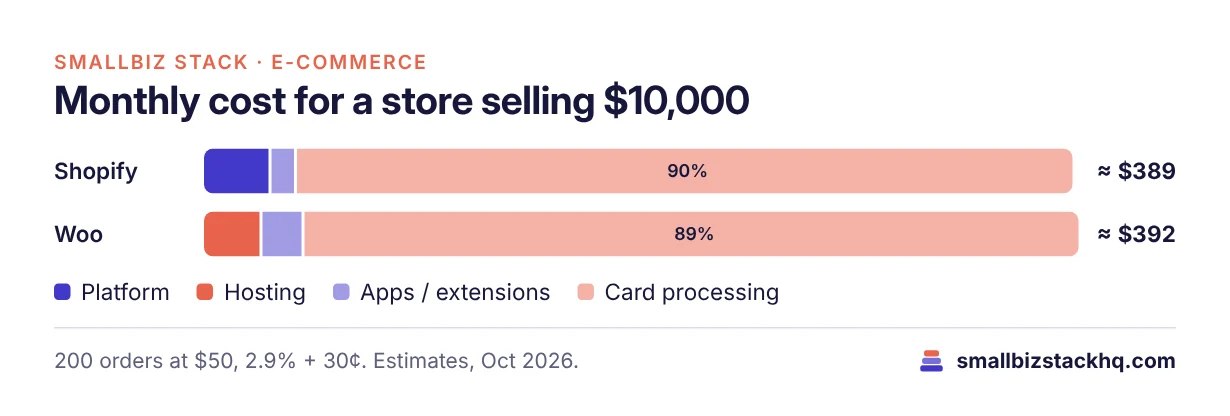
Card processing is about 90% of the bill in both cases. That is why choosing based on the subscription price alone is a mistake. For a small store, the platforms cost roughly the same; the real difference is time and control.
As sales grow, Shopify’s higher plans cut the card rate. At $50,000 a month, moving from Basic (2.9%) to Grow (2.7%) saves about $100 a month in processing, which more than covers most of the plan difference.
Features compared
Setup and ease of use
Shopify wins clearly. You can sign up, choose a theme, add products and take payments in an afternoon without touching code. WooCommerce requires a WordPress site, hosting and a few plugins. Many hosts offer one-click WooCommerce setups, but you are still responsible for updates and backups.
Design and customization
WooCommerce wins on control. Because it runs on WordPress, you can change almost anything, from checkout fields to product page layouts, and you own the code and data. Shopify has a large theme store and app ecosystem, and you can customize themes, but some deep changes (especially to checkout) are reserved for higher plans.
Payments
Shopify Payments is built in, and using it avoids the third-party fee. WooCommerce lets you use WooPayments, Stripe, PayPal, Square and many others with no platform fee on top.
Content and SEO
WordPress is one of the best blogging platforms available, so WooCommerce is a natural fit if content marketing is central to your business. Shopify includes a blog and solid SEO basics, and it is enough for most stores.
Security and maintenance
Shopify handles hosting, security, PCI compliance for its checkout and software updates. With WooCommerce, keeping WordPress, plugins and themes updated is your job or your host’s. Skipping updates is the most common way small WooCommerce stores run into trouble.
Scaling
Both scale well. Shopify scales without you thinking about servers, and its Advanced and Plus plans add lower card rates and enterprise features. WooCommerce scales if your hosting does, which means paying for better hosting as traffic grows.
Pros and cons
Shopify
Pros
- Fastest way to launch a professional store
- Hosting, security and updates included
- Lower card rates on higher plans
- Large app and theme ecosystem
Cons
- Extra transaction fee if you don’t use Shopify Payments
- Paid apps add up
- Less control over checkout and code
WooCommerce
Pros
- Free software with no revenue share
- Full control over design, data and code
- Any payment processor, no platform fee
- Excellent for content-driven stores on WordPress
Cons
- You manage hosting, updates and backups
- Costs are spread across hosting, themes and extensions
- Steeper learning curve for non-technical owners
Which should you choose?
Choose Shopify if you want to focus on products and marketing rather than software, you don’t have a developer, or you want a store live this week.
Choose WooCommerce if you already run a WordPress site, content and SEO are central to your business, you want to own every part of your store, or you need a payment processor Shopify charges extra for.
Total cost at three sales levels
Assuming a $50 average order, online card payments at 2.9% + 30¢ on both platforms (Shopify Payments and WooPayments at the top of its listed range) and yearly Shopify billing.
| Monthly sales | Shopify | WooCommerce |
|---|---|---|
| $2,000 (40 orders) | Basic $29 + $70 processing = about $99 | Hosting $25 + extensions ~$17 + $70 = about $112 |
| $10,000 (200 orders) | Basic $29 + $350 = about $379 | $25 + $17 + $350 = about $392 |
| $50,000 (1,000 orders) | Grow $79 + 2.7% × $50,000 + $300 = about $1,729 | Hosting ~$100 + $17 + $1,750 = about $1,867 |
At every size, the two platforms land within roughly 10% of each other. At high volume, Shopify’s lower card rate on Grow can tip the balance, unless you negotiate a better processing rate for WooCommerce.
Hidden costs on each platform
Payments in detail
Shopify Payments is built into Shopify and is the simplest option: no third-party fee, payouts to your bank, and support for major cards and digital wallets. Rates fall as you move up plans: 2.9% + 30¢ on Basic, 2.7% + 30¢ on Grow and 2.5% + 30¢ on Advanced for online cards. If you need a different processor, Shopify adds 0.6% to 2% on top.
WooCommerce works with WooPayments (about 2.5% to 2.9% + 30¢ according to WooCommerce) or with Stripe, PayPal, Square and many other gateways, with no WooCommerce fee on top. That flexibility lets larger stores shop around or negotiate custom rates with a processor.
For most small stores, the cost difference between the two payment setups is small. The bigger question is whether you want one integrated system (Shopify) or the freedom to choose (WooCommerce).
Shipping and sales tax
Both platforms let you set shipping zones, flat rates, free-shipping thresholds and carrier-calculated rates. Shopify includes discounted shipping labels for many US merchants, which can save meaningful money if you ship a lot. On WooCommerce, label printing and real-time carrier rates usually come from extensions or shipping apps.
For sales tax, both can calculate tax at checkout based on location. If you sell into many states, consider a dedicated tax tool and talk to an accountant about where you need to collect.
Speed and performance
Site speed affects both search rankings and sales. Shopify runs on a global infrastructure designed for e-commerce, so performance depends mainly on your theme and apps. WooCommerce speed depends heavily on your hosting, theme and plugins; a cheap shared host can make a store feel slow, while managed WooCommerce hosting can be very fast.
On either platform, the biggest wins are the same: compress images, limit the number of apps or plugins, and choose a lightweight theme.
Owning your store and data
With WooCommerce, you own the code and the database, and you can move to any host. With Shopify, your store runs on Shopify’s platform; you can export your products, customers and orders, but your theme and apps stay on Shopify. For most small businesses, either is fine. If long-term independence from a single vendor matters to you, WooCommerce gives you more of it.
E-commerce terms in plain English
- Payment gateway: The service that processes card payments, such as Shopify Payments, WooPayments or Stripe.
- Transaction fee: A platform fee on top of card processing; Shopify charges one only when you don’t use Shopify Payments.
- Hosted vs self-hosted: Hosted (Shopify) means the platform runs the servers; self-hosted (WooCommerce) means you choose and pay for hosting.
- Extension, plugin or app: Add-on software that adds features to your store.
- SKU: A unique code for each product variant.
- Abandoned cart: A checkout started but not completed; recovery emails can win back sales.
- Conversion rate: The share of visitors who buy.
Frequently asked questions
Shopify
- Apps: Reviews, subscriptions, upsells, bundles and advanced shipping are often paid apps with monthly fees.
- Premium themes: A one-time purchase if you don’t use a free theme.
- Third-party payment fee: 2% on Basic if you don’t use Shopify Payments.
- International selling: Extra markets and currency conversion can add costs.
WooCommerce
- Better hosting as you grow: WooCommerce estimates $25 to $350 a month for most stores; busy stores need the upper end.
- Premium extensions: Typically $29 to $299 a year each, and they add up across subscriptions, bookings and shipping tools.
- Security and backups: Some hosts include them; otherwise budget for a security plugin and backups.
- Developer time: Updates, plugin conflicts and customizations may need paid help.
Which platform fits your business
| Business type | Better fit | Why |
|---|---|---|
| First online store, no developer | Shopify | Fastest setup, hosting and security included |
| Content-heavy brand (blog, recipes, guides) | WooCommerce | WordPress is a top blogging platform |
| Existing WordPress site adding a shop | WooCommerce | Add selling without moving your site |
| Fast-growing DTC brand | Shopify | Scales without managing servers |
| Store with unusual checkout or product logic | WooCommerce | Full control over code |
| Seller who also sells in person | Shopify | Built-in POS ecosystem |
| Subscription box business | Either | Both support subscriptions via apps or extensions |
Launch checklist (either platform)
- Buy your domain and connect it.
- Choose a theme and set up your homepage, product page and collection templates.
- Add products with clear photos, descriptions, variants and prices.
- Set up payments and test a real order end to end, including a refund.
- Configure shipping zones and rates, and taxes for the states where you collect them.
- Write your policies: shipping, returns, privacy and terms.
- Install analytics and connect Google Search Console.
- Set up email marketing with a welcome flow and abandoned cart emails. See Klaviyo vs Mailchimp.
- Check mobile speed and fix large images.
- Launch, then review conversion rate and abandoned carts weekly.
Migrating between Shopify and WooCommerce
Both directions are common. Shopify offers import tools, and migration apps and services move products, customers and orders either way. The step that matters most for SEO is redirects: map every old product and collection URL to its new address so search rankings and links carry over. Plan the move for a quiet sales period, and test checkout thoroughly before you switch your domain.
Is WooCommerce good for beginners?
It can be, especially with a host that offers one-click WooCommerce setup and managed updates. But beginners usually get a store live faster on Shopify.
Which is better for SEO?
Both can rank well. WooCommerce benefits from WordPress’s blogging strengths; Shopify includes solid SEO basics. Content quality and site speed matter more than the platform.
Is WooCommerce really free?
The plugin is free, with no monthly fee and no revenue share. You still pay for hosting, a domain, any premium extensions and card processing.
Which is cheaper for a small store?
Usually neither by much. Card processing dominates the cost at 2.5%–2.9% plus 30¢ per transaction on both. Shopify can be slightly cheaper if you would otherwise pay for premium hosting; WooCommerce can be cheaper if you already have hosting.
Can I move from WooCommerce to Shopify later?
Yes. Shopify offers import tools for products, customers and orders, and migration apps handle more complex stores. Plan your URL redirects so you don’t lose search rankings.
Does Shopify charge transaction fees?
Only if you use a payment provider other than Shopify Payments: 2% on Basic, 1% on Grow, 0.6% on Advanced and 0.2% on Plus, on top of your provider’s own fees.
Do I need a developer for WooCommerce?
Not to start, especially with a host that offers one-click setup. A developer becomes useful for custom features or if you would rather not handle updates and troubleshooting yourself.
The bottom line
For most small businesses that want to start selling quickly, Shopify is the easier and safer choice. WooCommerce is the better fit if you value control, already use WordPress or build your business around content. Run the numbers with your expected order volume: payment fees, not subscription prices, decide most of the cost.
Related: to email your customers, see Mailchimp vs Kit. Selling in person too? Read Square vs Toast.