
Last updated: October 2026 | Prices checked against Wave’s and FreshBooks’ official pricing pages
Disclosure: SmallBiz Stack is reader-supported. Some links on this site may be affiliate links, which means we may earn a commission at no extra cost to you. This never changes our verdicts. Prices change often, so confirm the current rate on the vendor’s site before you sign up.
FreshBooks and Wave are both built for the same kind of business: freelancers, consultants and small service firms whose main job in the software is sending invoices and getting paid. They take opposite approaches to price. Wave gives you unlimited invoicing and bookkeeping for free and charges for automation. FreshBooks charges from the first month but adds the client tools that service businesses use every day: proposals, time tracking, projects and team access.
This guide compares the two on price, invoicing, bookkeeping, payments and growth, with worked cost examples for three typical freelancers.
FreshBooks vs Wave at a glance
| Wave | FreshBooks | |
|---|---|---|
| Free plan | Starter: unlimited invoices, estimates, bills and bookkeeping records | No (introductory discount) |
| Cheapest paid plan | Pro: $19/mo or $190/yr | Lite: $23/mo |
| Client limits | None | 5 (Lite), 50 (Plus), unlimited (Premium) |
| Automatic bank import | Pro | All plans |
| Proposals | Estimates only | Unlimited proposals from Plus |
| Time tracking and projects | No | Yes |
| Extra team members | Not sold per seat | $11/mo each |
| Payroll | Add-on from $25/mo | FreshBooks Payroll $40/mo + $6 per user |
| Best for | Freelancers who mainly need free, unlimited invoicing | Service businesses that bill time and send proposals |
Wave pricing in 2026
| Wave plan | Price | Key features |
|---|---|---|
| Starter | $0 | Unlimited estimates, invoices, bills and bookkeeping records; mobile invoicing; cash flow dashboard |
| Pro | $19/mo or $190/yr | Everything in Starter, plus automatic bank imports and categorization, unlimited receipt capture, automated late payment reminders |
Card payments: On Starter, online card payments cost 2.9% + 60¢ (3.4% + 60¢ for Amex). On Pro, your first 10 card transactions each month are 2.9% with no fixed fee, then 2.9% + 60¢.
Add-ons: Receipt capture on Starter is an add-on. Wave Payroll starts at $25 a month, and Wave Advisors (bookkeeping help) starts at $149 a month.
FreshBooks pricing in 2026
| FreshBooks plan | Monthly price | Billable clients | Key features |
|---|---|---|---|
| Lite | $23 | 5 | Unlimited invoices, recurring invoices, mileage tracking |
| Plus | $43 | 50 | Unlimited proposals, double-entry reports, accountant access |
| Premium | $70 | Unlimited | Everything in Plus |
| Select | Custom | Unlimited | Includes 2 team members and Advanced Payments |
When we checked, FreshBooks was offering 80% off Lite, Plus and Premium for the first four months. Team members cost $11 a month each, and Advanced Payments costs $20 a month on most plans.
The client limit is the catch. Lite covers only five billable clients. If you invoice more than five clients regularly, budget for Plus at $43 a month.
Yearly cost for three freelancers
| Situation | Wave | FreshBooks |
|---|---|---|
| Solo writer, 4 clients, bank entry by hand is fine | Starter: $0 | Lite: $276 |
| Solo designer, 12 clients, wants bank feeds | Pro (yearly): $190 | Plus: $516 |
| Consultant with 1 assistant, 30 clients, proposals and time | Pro: $190 (no proposals or time tracking) | Plus + 1 team member: $648 |
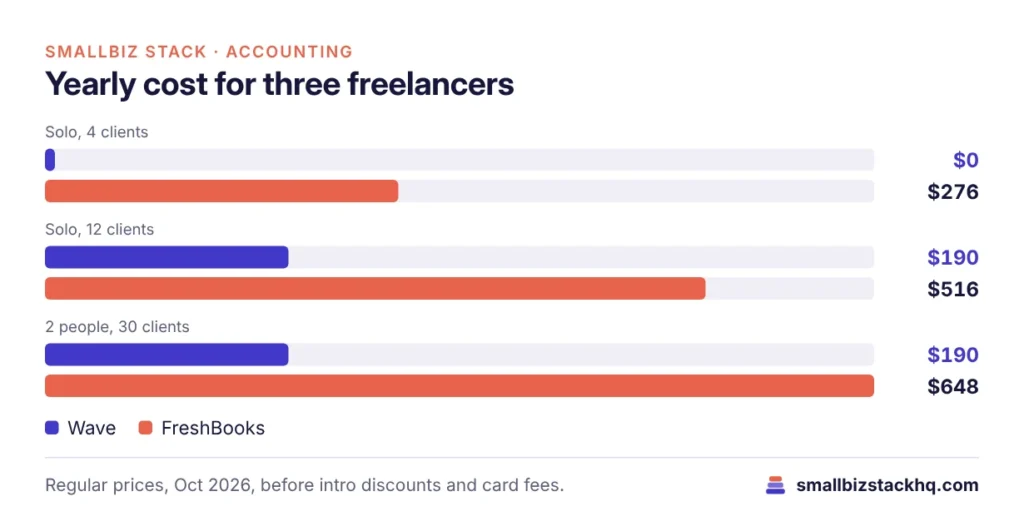
Regular prices before introductory discounts and card processing fees.
Wave is cheaper in every scenario. The question is whether the features FreshBooks adds (proposals, time tracking, projects and team access) are worth about $23 to $38 more a month to you. For a consultant who bills by the hour, they often are: one forgotten billable hour a month can cost more than the price difference.
Features compared
Invoicing
Both send professional, branded invoices with online payment links, recurring billing and payment reminders. Wave’s biggest strength is that unlimited invoicing is free. FreshBooks’ invoicing is more polished for client work: deposits, retainers, late fees, client portals and estimates that turn into invoices with one click.
Proposals and estimates
Wave offers estimates that convert into invoices. FreshBooks adds full proposals from the Plus plan, with scope, timelines and e-signature acceptance, which matters for agencies and consultants who win work through written proposals.
Time tracking and projects
This is the clearest difference. FreshBooks tracks time against clients and projects and pulls billable hours straight onto invoices. Wave has no built-in time tracking, so hourly freelancers need a separate timer and copy hours across by hand.
Bookkeeping and reports
Wave’s Starter plan includes double-entry bookkeeping records and standard reports for free, which is unusual. Automatic bank imports require Pro. FreshBooks imports bank transactions on every plan and adds double-entry reports (balance sheet, general ledger, trial balance) from Plus, which is what most accountants want to see at tax time.
Card payments
Wave charges 2.9% + 60¢ per online card payment on Starter, which is a high fixed fee on small invoices: about 4% on a $50 invoice. Pro waives the fixed fee on your first 10 card payments each month. FreshBooks processes card payments through its own payments service and partners; check its current rates on the pricing page, and remember that ACH bank transfers are usually cheaper than cards for large invoices on either platform.
Teams and accountants
Wave is designed around the owner, with collaborator access for an accountant. FreshBooks charges $11 a month per team member and gives your accountant access from Plus. For a small team billing time, FreshBooks is the more complete tool.
Payroll
Wave Payroll starts at $25 a month as an add-on. FreshBooks Payroll costs $40 a month plus $6 per user. Many freelancers with no employees don’t need either; if you hire, compare both with standalone services such as Gusto and OnPay.
Which should you choose?
Choose Wave if:
- You want free, unlimited invoicing and basic bookkeeping.
- You have fewer automation needs and don’t track billable hours.
- You’re happy to upgrade to Pro ($190 a year) for bank feeds when entering transactions by hand gets tedious.
Choose FreshBooks if:
- You bill by the hour or by project and want time to flow onto invoices.
- You win work with written proposals.
- You have a small team or an assistant who needs their own login.
- You want double-entry reports ready for your accountant (Plus and up).
Three real-world scenarios
A freelance copywriter with four retainer clients. Wave Starter handles monthly recurring invoices for free. FreshBooks Lite would work too, but at $276 a year it adds little she needs.
A web developer billing 20 clients by the hour. FreshBooks Plus ($43 a month) is worth it: time tracking feeds invoices, and proposals help win projects. Wave would require a separate time tracker.
A cleaning business owner with two part-time employees. Wave Pro plus Wave Payroll keeps costs low. If scheduling and job management matter more, look at field service tools like Jobber or Housecall Pro.
Questions to ask before you choose
- How many clients do you invoice in a typical month? More than five rules out FreshBooks Lite.
- Do you bill time? If yes, FreshBooks saves copying hours by hand.
- How large are your invoices? Wave’s 60¢ fixed card fee hurts most on small invoices.
- Does your accountant need double-entry reports? Wave includes them; FreshBooks from Plus.
- Will you hire this year? Compare each payroll add-on with standalone payroll.
Switching between FreshBooks and Wave
Both let you export customers, invoices and reports as CSV files. The cleanest approach is to switch at the start of a month or quarter: finish collecting open invoices in the old tool, start new invoices in the new one, and ask your accountant whether to bring over opening balances or full history. Keep your old account for reference until tax season is over.
Frequently asked questions
Is Wave really free?
Yes. Wave Starter is free with unlimited invoices, estimates, bills and bookkeeping records. You pay card processing fees when clients pay online, and automation such as bank imports and receipt capture requires Pro or add-ons.
Is FreshBooks worth it over Wave?
For freelancers who bill time, send proposals or work with a small team, yes. If you only send a few fixed-price invoices a month, Wave’s free plan does the job.
Does FreshBooks have a free plan?
No. It offers introductory discounts instead, such as 80% off for the first four months when we checked.
Which is better for taxes?
Both produce the profit and loss report your tax preparer needs. FreshBooks Plus and Wave both include double-entry reports. Ask your accountant which they prefer; this is a software comparison, not tax advice.
Can I use Wave and FreshBooks with QuickBooks?
They are alternatives to QuickBooks rather than add-ons. If your accountant insists on QuickBooks, see QuickBooks vs FreshBooks and Wave vs QuickBooks.
The bottom line
Wave is the best value for freelancers who mainly need to send invoices and keep clean books: it’s free, and Pro adds bank feeds for $190 a year. FreshBooks costs more but earns it for service businesses that bill time, send proposals or have a small team. Start with Wave if you’re unsure; move to FreshBooks when time tracking and proposals start costing you hours.
Related: QuickBooks vs FreshBooks · Wave vs QuickBooks · QuickBooks Online vs Xero
Related guides
These comparisons connect directly to this topic:
- Xero vs Zoho Books (2026): Which Accounting Software Is Better Value?
- Best Accounting Software for Etsy Sellers (2026): Wave vs QuickBooks vs Xero
- Gusto vs QuickBooks Payroll (2026): Which Is Better for Small Businesses?
- Gusto vs ADP RUN (2026): Which Payroll Service Is Better for Small Businesses?
Sources and further reading
Plan prices, limits and features in this comparison were checked against the vendors’ own pages listed below. Software companies change plans and prices often, so confirm the current price on the vendor page before you buy. How we research and update articles is explained in our editorial policy.