
Last updated: October 2026 | Square prices from Square’s official pricing page; Toast and Clover figures from their sites and independent pricing reviews
Disclosure: SmallBiz Stack is reader-supported. Some links on this site may be affiliate links, which means we may earn a commission at no extra cost to you. This never changes our verdicts. Prices change often, so confirm the current rate on the vendor’s site before you sign up.
Coffee shops are a special case for point-of-sale systems. Tickets are small (often $5 to $8), lines move fast at rush hour, and many customers tap or pay by phone. That means the fixed fee per transaction (the “+ 15¢” or “+ 10¢”) matters far more for a café than for a restaurant with $60 tickets.
The options at a glance
| Square | Toast | Clover | |
|---|---|---|---|
| Monthly software | Free; Plus $49; Premium $149 per location | Starter Kit $0; Point of Sale from $69 | Restaurant bundles, often $89.95/mo software |
| In-person card rate | 2.6% + 15¢ (Free), 2.5% + 15¢ (Plus) | About 3.09% + 15¢ (Starter Kit), about 2.49% + 15¢ (paid plans), reported | 2.3% + 10¢ on restaurant bundles (reported) |
| Hardware | Reader from $59; registers and kiosks extra | Handhelds and terminals, financing available | Bundles from $849 (Mini) upfront, or monthly |
| Contract | Month to month | Often 1–3 years (reported) | Often 36–48 months (reported) |
| Best for | New cafés and small coffee bars | Busy cafés wanting restaurant-grade tools | Established cafés wanting all-in-one hardware |
Why the fixed fee matters
On a $6 latte:
| Rate | Fee on $6 | Effective rate |
|---|---|---|
| 2.6% + 15¢ | $0.31 | 5.1% |
| 2.5% + 15¢ | $0.30 | 5.0% |
| 2.3% + 10¢ | $0.24 | 4.0% |
| 3.09% + 15¢ | $0.34 | 5.6% |
A coffee shop can effectively pay 4% to 5.6% on small tickets, compared with about 3% for a restaurant with larger checks.
Cost example: a café doing $20,000 a month
Assume 3,300 card transactions averaging about $6.
| Setup | Software | Processing | Monthly total (before hardware) |
|---|---|---|---|
| Square Free | $0 | 2.6% × $20,000 + 15¢ × 3,300 = $1,015 | About $1,015 |
| Square Plus | $49 | 2.5% × $20,000 + 15¢ × 3,300 = $995 | About $1,044 |
| Toast Point of Sale (reported) | $69 | 2.49% × $20,000 + 15¢ × 3,300 = $993 | About $1,062 |
| Toast Starter Kit (reported) | $0 | 3.09% × $20,000 + 15¢ × 3,300 = $1,113 | About $1,113 |
| Clover QSR bundle (reported) | $89.95 | 2.3% × $20,000 + 10¢ × 3,300 = $790 | About $880 + hardware |
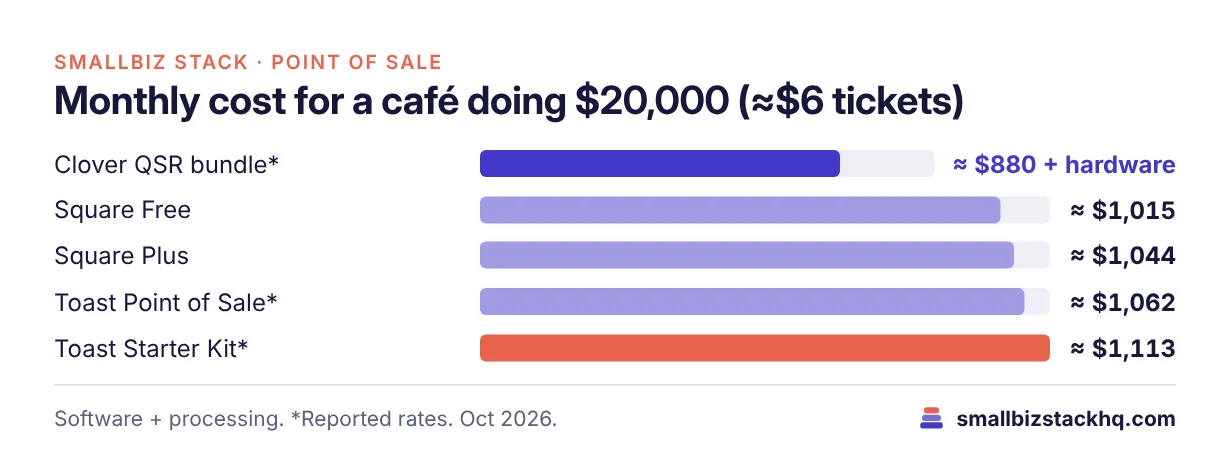
Clover’s lower 10¢ fixed fee makes a real difference at coffee-shop ticket sizes, saving about $135 a month against Square Free in this example. But Clover’s hardware costs more upfront and contracts are common. Square remains the cheapest way to start with no commitment.
What each does best
Square
Free plan, fast setup, affordable hardware and no contract. Square’s ecosystem includes online ordering, loyalty and payroll. For a new café, it’s the lowest-risk start.
Toast
Built for restaurants and cafés, with handhelds, kitchen display screens and restaurant reporting. Best for high-volume cafés that also serve food and want a full restaurant system, if you’re comfortable with a contract.
Clover
All-in-one hardware such as the Mini and Station, and lower fixed fees on its restaurant bundles. A good fit for established cafés with steady volume, if you negotiate the contract carefully.
Three real-world scenarios
A new coffee cart. Square Free with a $59 reader keeps startup costs minimal.
A busy café with a kitchen, doing $40,000 a month. Toast’s paid plan or Clover’s bundle can make sense; get written quotes from both.
An established coffee shop with steady $25,000 months. Clover’s 10¢ fixed fee could save over $1,500 a year in processing against Square Free, but compare it with hardware and contract costs.
Questions to ask before you sign up
- What’s your average ticket? The smaller it is, the more the fixed fee matters.
- How long is the contract? And what’s the early termination fee?
- Can you own the hardware outright? And does it work with other processors?
- Do you need online ordering or loyalty? Check what’s included and what costs extra.
- How will tips be handled? Make sure tip prompts and payroll tip reporting work for your team.
Features that matter most for cafés
- Speed at checkout: One-tap modifiers (milk, size, extra shot) keep lines moving.
- Tipping prompts: Custom tip screens on card readers can meaningfully increase staff tips.
- Online ordering and pickup: Mobile orders reduce line pressure at rush hour.
- Loyalty: Simple digital punch cards bring regulars back.
- Kitchen or bar display: Useful once you have a separate drink station or prepare food.
- Inventory for ingredients: Helpful for tracking milk, beans and pastries, though many small cafés track this outside the POS.
Setup checklist
- Build your menu with modifiers and prices before opening.
- Set up tip options and test them on the reader.
- Add staff accounts with timecards for payroll.
- Connect your bank account and check the payout schedule.
- Turn on receipts by text or email to collect customer contacts.
- Run a few test transactions, including a refund.
Frequently asked questions
What is the best POS for a small coffee shop?
For new and small cafés, Square is the best starting point: free plan, no contract and cheap hardware. For established cafés with steady volume, compare Clover’s lower fixed fee and Toast’s restaurant features.
Why are card fees higher for coffee shops?
Because fixed per-transaction fees (10¢–15¢) are a larger share of small tickets.
Do I need a kitchen display system?
Only if you prepare food or have a separate drink station that benefits from a screen. Square, Toast and Clover all offer them for an extra fee.
Can I switch POS later?
Yes, but contracts and hardware can make it costly. Square’s month-to-month terms make switching easiest.
The bottom line
Square is the best low-risk POS for new and small coffee shops. Clover’s lower fixed fee can save money for busy, established cafés, and Toast suits cafés that run like restaurants. Always compare total monthly cost at your real ticket size.
Related: Square vs Toast · Square vs Clover · Best payroll for restaurants