
Last updated: October 2026 | HubSpot prices from HubSpot’s pricing page; Salesforce prices from Salesforce’s published small business editions as reported by independent pricing trackers
Disclosure: SmallBiz Stack is reader-supported. Some links on this site may be affiliate links, which means we may earn a commission at no extra cost to you. This never changes our verdicts. Prices change often, so confirm the current rate on the vendor’s site before you sign up.
HubSpot and Salesforce are the two biggest names in CRM, and both now sell editions designed for small businesses. Salesforce is the market leader for large sales organizations, with almost unlimited customization. HubSpot built its name on ease of use and a free CRM, and connects sales, marketing and service in one platform.
For a small business, the question isn’t which is more powerful. It’s which one your team will actually set up and use, at a price that makes sense.
HubSpot vs Salesforce at a glance
| HubSpot Sales Hub | Salesforce | |
|---|---|---|
| Free plan | Yes, up to 2 users | No (30-day free trial) |
| Small business entry | Starter, from $20/seat/mo (monthly billing) | Starter Suite, $25/user/mo |
| Next tier | Professional, $90/seat/mo (annual) + $1,500 onboarding | Pro Suite, $100/user/mo (annual) |
| Larger editions | Enterprise from $150/seat | Core, Advanced and Max editions for larger teams |
| Setup effort | Low | Medium to high |
| Customization | Good | Extensive |
| Best for | Small teams that want fast adoption and marketing in one place | Teams with complex processes or plans to scale a large sales org |
HubSpot Sales Hub pricing in 2026
| Plan | Price per seat | Onboarding | Highlights |
|---|---|---|---|
| Free | $0, up to 2 users | None | Contacts, deals, 1-to-1 email (HubSpot branding), meeting link |
| Starter | From $20/mo (monthly billing) | None | Up to 50 workflows, 15 pipelines, 500 calling minutes |
| Professional | $90/mo annual ($100 monthly) | $1,500 | Sequences, 300 workflows, forecasting, 100 custom reports |
| Enterprise | From $150/mo | $3,500 | 1,000 workflows, team forecasting, advanced controls |
Salesforce pricing in 2026
Salesforce’s small business editions, as listed by independent pricing trackers using Salesforce’s published rates:
| Edition | Price per user per month | Highlights |
|---|---|---|
| Starter Suite | $25 (monthly or annual billing) | Contact and opportunity management, lead routing, sales workflows |
| Pro Suite | $100 (annual billing) | More customization and automation, quotes and forecasting |
| Larger editions | Higher tiers for bigger teams | Advanced customization, AI and enterprise features |
Salesforce offers a 30-day free trial of Sales Cloud without a credit card. Implementation partners, add-on products and API access on lower tiers can add to the cost.
First-year cost for a 5-person team
| Setup | Calculation | First-year cost |
|---|---|---|
| HubSpot Starter (monthly billing) | $20 × 5 × 12 | $1,200 |
| Salesforce Starter Suite | $25 × 5 × 12 | $1,500 |
| Salesforce Pro Suite (annual) | $100 × 5 × 12 | $6,000 |
| HubSpot Professional (annual) | $90 × 5 × 12 + $1,500 | $6,900 |
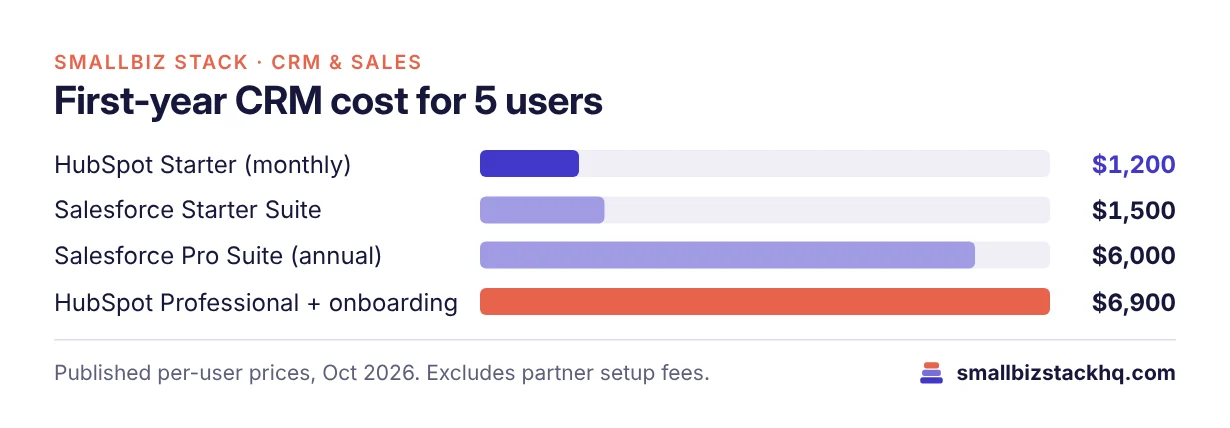
At entry level the two are close. At the professional tier, Salesforce Pro Suite is slightly cheaper in year one because HubSpot charges an onboarding fee, but many small businesses pay a Salesforce partner for setup, which can more than close that gap.
Features compared
Ease of setup and use
HubSpot is designed to be usable on day one: import contacts, set up a pipeline and start working. Salesforce’s Starter Suite simplifies setup compared with classic Salesforce, but the platform rewards configuration, and many teams eventually hire an admin or partner.
Customization
Salesforce is famous for customization: custom objects, complex automation, deep permissions and a huge app marketplace. HubSpot is customizable too, with custom properties, pipelines and objects on higher tiers, but it stops short of Salesforce’s flexibility.
Marketing
HubSpot’s marketing tools (forms, landing pages, email, ads) live on the same CRM, which is a major advantage for small teams doing inbound marketing. Salesforce offers marketing products as well, but they are separate products with their own pricing.
Reporting and forecasting
Both offer dashboards and forecasting on their professional tiers. Salesforce’s reporting is extremely powerful once configured; HubSpot’s is easier to build without an admin.
Ecosystem
Salesforce’s AppExchange and partner network are the largest in CRM. HubSpot’s marketplace is large and growing, with simpler integrations for common small business tools.
Three real-world scenarios
A 3-person startup selling a single product. HubSpot Free or Starter gets the team running in an afternoon. Salesforce would be more than they need.
A 10-person B2B company with a complex quoting process. Salesforce Pro Suite’s quoting and customization may fit their process better, especially if they plan to grow a larger sales team.
A 6-person agency generating leads from content. HubSpot connects their blog, forms, email and pipeline in one system, which is hard to beat for inbound marketing.
Questions to ask before you sign up
- Who will administer the CRM? If nobody has time, HubSpot’s ease of use is decisive.
- How unique is your sales process? Complex approvals, territories and custom objects point to Salesforce.
- Will you run marketing from the CRM? HubSpot’s connected platform is the strongest option.
- What will setup really cost? Include partner fees for Salesforce and onboarding fees for HubSpot Professional.
- Where will you be in three years? Choose the platform you can grow into without migrating.
Pros and cons
HubSpot
Pros
- Free CRM and fast adoption
- Marketing, sales and service in one platform
- Easy reporting without an admin
Cons
- Big jump in price at Professional
- Onboarding fees on higher tiers
- Less customizable than Salesforce
Salesforce
Pros
- Unmatched customization and ecosystem
- Small business editions at reasonable entry prices
- Scales to very large sales teams
Cons
- No free plan
- More setup effort; partners often needed
- Marketing tools sold separately
Hidden costs to plan for
- Implementation: Many Salesforce customers hire a consulting partner for setup; HubSpot Professional charges a required onboarding fee.
- Add-ons: Marketing, service and AI features may be sold separately on both platforms.
- Admin time: Someone needs to own the CRM, maintain fields, reports and automations. On Salesforce this is often a dedicated role as the company grows.
- Integrations: Some connectors and API access cost extra on lower tiers.
- Training: Budget time for the team to learn the system; adoption is what makes a CRM pay off.
Frequently asked questions
Is Salesforce too complicated for a small business?
Not necessarily. Starter Suite is designed for small teams. But Salesforce’s strength is customization, and getting the most from it usually takes setup time or outside help.
Is HubSpot cheaper than Salesforce?
At entry level they’re close: HubSpot Starter from $20 per seat, Salesforce Starter Suite $25 per user. HubSpot also has a free plan, which Salesforce doesn’t.
Can I move from HubSpot to Salesforce later?
Yes. Many companies start on HubSpot and move to Salesforce as their sales process becomes more complex. Plan the data migration carefully.
Which has better mobile apps?
Both have capable iOS and Android apps for managing contacts and deals on the go.
The bottom line
For most small businesses, HubSpot is the easier and faster choice, especially if marketing matters. Salesforce is the better fit for teams with complex sales processes or ambitions to build a large sales organization. Try HubSpot Free and Salesforce’s 30-day trial with your real pipeline.
Related: Pipedrive vs HubSpot · Zoho CRM vs HubSpot