
Last updated: October 2026 | Prices checked against each provider’s official pricing page; ADP quotes individually
Disclosure: SmallBiz Stack is reader-supported. Some links on this site may be affiliate links, which means we may earn a commission at no extra cost to you. This never changes our verdicts. Prices change often, so confirm the current rate on the vendor’s site before you sign up.
Running payroll yourself means calculating withholding, paying employees on time, filing federal, state and sometimes local payroll taxes, and sending W-2s and 1099s at year end. A mistake can mean penalties. Full-service payroll software does all of that for a predictable monthly fee, and for most small businesses it costs a base fee plus around $6 per person.
We compared six widely used options on price, features and fit. Here is what each costs and who it’s best for.
The best payroll software at a glance
| Provider | Price | Multi-state | Best for |
|---|---|---|---|
| Gusto | $49–$180/mo + $6–$22 per person | Plus and Premium | Owners who want simple, modern payroll with room to add HR |
| OnPay | $49/mo + $6 per worker | Included | Best value with phone support and multi-state included |
| Square Payroll | $35/mo + $6 per person | Included (full-service plan) | Businesses using Square POS, hourly and tipped teams |
| QuickBooks Payroll | From $88/mo + $6.50 per employee (with accounting) | Check plan | Businesses committed to QuickBooks Online |
| ADP RUN | Quote only | All packages | Businesses wanting phone-first service and room to grow |
| Wave Payroll | Add-on from $25/mo | Check terms | Wave users with a few employees |
Cost for a 10-person team in one state
| Option | Calculation | Monthly cost |
|---|---|---|
| Square Payroll | $35 + 10 × $6 | $95 |
| Gusto Simple | $49 + 10 × $6 | $109 |
| OnPay | $49 + 10 × $6 | $109 |
| QuickBooks Payroll + Simple Start | $88 + 10 × $6.50 | $153 (includes accounting software) |
| Gusto Plus | $80 + 10 × $12 | $200 |
| Gusto Premium | $180 + 10 × $22 | $400 |
| ADP RUN | Quote | Ask for a written quote |
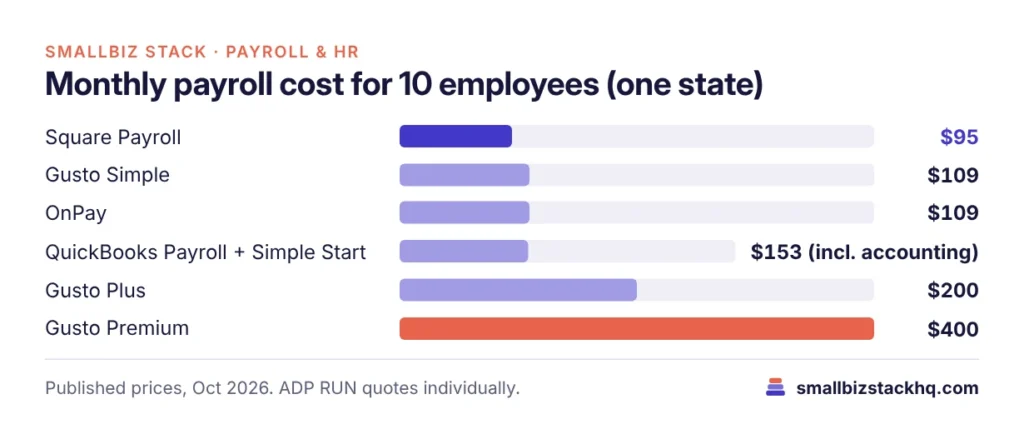
Regular prices. QuickBooks bundles were 50% off the base price for the first three months when we checked, and ADP was advertising up to six months of free payroll for new small business customers (see ADP’s terms).
Square, Gusto Simple and OnPay land within $15 a month of each other. The real differences are in what’s included: multi-state payroll, time tracking, HR tools and support.
The options
Gusto: best overall for most small businesses
Gusto is a widely used standalone payroll service for small businesses, with clear pricing and a setup most owners can finish in an afternoon.
| Gusto plan | Base | Per person | Key additions |
|---|---|---|---|
| Simple | $49/mo | $6/mo | Payroll in one state, unlimited runs, tax filings |
| Plus | $80/mo | $12/mo | Multi-state payroll, time tracking and scheduling, next-day direct deposit |
| Premium | $180/mo | $22/mo | HR guidance and tools, dedicated account partner, same-day pay |
Watch out: Simple covers employees in one state only. A single remote employee in another state means moving to Plus. See Gusto vs ADP RUN and Gusto vs QuickBooks Payroll.
OnPay: best value
OnPay’s single plan costs $49 a month plus $6 per worker and includes multi-state payroll, unlimited pay runs, federal, state and local tax filings, and support by phone, chat and email. HR tools ($15 base + $2 per worker) and time tracking ($15 base + $4 per worker) are optional add-ons. For a team with employees in more than one state, OnPay is often the cheapest full-featured choice. See OnPay vs Gusto.
Square Payroll: best for Square POS users
Square Payroll costs $35 a month plus $6 per person, with automatic tax filings, timecard import from Square POS, direct-tip tracking and overtime calculations. A contractor-only plan costs $6 per person with no base fee. If your shop, café or restaurant already runs on Square, it’s the easiest option. See best payroll for restaurants.
QuickBooks Payroll: best for QuickBooks users
Intuit sells payroll bundled with a QuickBooks Online plan:
| QuickBooks bundle | Base | Per employee | Includes |
|---|---|---|---|
| Payroll + Simple Start | $88/mo | $6.50/mo | Full-service payroll, next-day direct deposit, basic accounting |
| Payroll + Essentials | $125/mo | $6.50/mo | Same-day direct deposit, enhanced reports, 3 users |
| Premium + Plus | $203/mo | $10/mo | Time tracking, HR suite, project profitability, inventory, 5 users |
Because accounting is included, compare it with Gusto or OnPay plus your accounting software, not payroll alone. See QuickBooks Online plans.
ADP RUN: best for phone-first service and growth
ADP RUN is sold through a sales rep with quoted pricing. Its packages (Essential, Enhanced, Complete Payroll & HR Plus and HR Pro) all include multi-jurisdiction payroll and tax filing, with higher packages adding hiring, HR help and compliance tools. ADP does not publish RUN prices on its site, so ask for a written quote.
Wave Payroll: best for Wave users
If you already run your books on Wave, its payroll add-on starts at $25 a month. Check which states offer full tax filing before you sign up.
How to choose
| If you… | Start with |
|---|---|
| Want the simplest modern payroll in one state | Gusto Simple |
| Have employees in several states on a budget | OnPay |
| Use Square POS | Square Payroll |
| Run your books in QuickBooks Online | QuickBooks Payroll bundle |
| Want a rep and plan to grow past 50 employees | ADP RUN |
| Need HR guidance as well as payroll | Gusto Premium or OnPay with HR add-on |
| Pay only contractors | Square’s contractor plan or Gusto/OnPay per-person billing |
What full-service payroll should include
- Automatic tax filing and payments for federal, state and local payroll taxes.
- Direct deposit with a clear deadline (next-day or same-day on some plans).
- W-2s and 1099s prepared and filed at year end.
- New-hire reporting to your state.
- Employee self-service for pay stubs and tax forms.
- Integrations with your accounting software and time clock.
Hidden costs to budget for
- Per-person fees on part-timers and contractors in months you pay them.
- Multi-state payroll on plans that cover one state only.
- Time tracking and HR add-ons on some providers.
- Mailed forms: Square charges $3 per mailed W-2 or 1099; digital delivery is included.
- Workers’ comp and benefits, which are separate from payroll fees.
Paying yourself as an owner
If you run an S corporation, you need to pay yourself a reasonable salary through payroll. Several providers offer low-cost options for one-person payroll. See payroll for S corp owners. Ask your accountant how to set your salary; this is a software comparison, not tax advice.
Setting up payroll in five steps
- Get an EIN and register for state withholding and unemployment insurance accounts.
- Collect W-4s, state forms and bank details from employees (most providers do this digitally).
- Enter pay rates, schedules and benefits deductions.
- Connect your accounting software and time clock.
- Run a test payroll and review the first two pay runs closely.
Frequently asked questions
What is the cheapest payroll software for small business?
Among full-service options, Square Payroll at $35 + $6 per person is cheapest for most team sizes. Gusto Simple and OnPay start at $49 + $6, and OnPay includes multi-state payroll.
Is Gusto or OnPay better?
They cost the same at the entry level. OnPay includes multi-state payroll and phone support in its one plan; Gusto’s higher plans include time tracking and HR guidance.
Do I need payroll software for one employee?
It’s strongly recommended. Even one employee means withholding, tax deposits, quarterly filings and a W-2, and penalties for late filing add up fast.
Can payroll software pay contractors?
Yes. Gusto, OnPay and Square pay contractors and file 1099s; contractors typically count toward per-person fees only in months you pay them.
The bottom line
For most small businesses, Gusto is the best all-round choice and OnPay the best value, especially across state lines. Square Payroll is the cheapest and easiest for Square users, QuickBooks Payroll makes sense if you’re committed to QuickBooks, and ADP RUN suits businesses that want a rep and expect to grow fast.
Related: Gusto vs ADP RUN · OnPay vs Gusto · Gusto vs QuickBooks Payroll · Best payroll for restaurants
Sources and further reading
Plan prices, limits and features in this comparison were checked against the vendors’ own pages listed below. Software companies change plans and prices often, so confirm the current price on the vendor page before you buy. How we research and update articles is explained in our editorial policy.