
Last updated: October 2026 | Housecall Pro prices checked on its pricing page; Jobber prices from Jobber’s published plans as reported by independent pricing trackers
Disclosure: SmallBiz Stack is reader-supported. Some links on this site may be affiliate links, which means we may earn a commission at no extra cost to you. This never changes our verdicts. Prices change often, so confirm the current rate on the vendor’s site before you sign up.
Jobber and Housecall Pro are the two best-known field service apps for home service contractors: plumbers, electricians, HVAC techs, cleaners, landscapers and handymen. Both handle the whole job cycle, from booking and quoting to scheduling, dispatching, invoicing and getting paid. They work as a CRM for contractors: every customer, job and payment in one place.
The biggest practical difference is pricing. Jobber charges per user. Housecall Pro charges per company and includes a set number of users. For a solo operator, Jobber is cheaper; for a crew, Housecall Pro often wins.
Jobber vs Housecall Pro at a glance
| Jobber | Housecall Pro | |
|---|---|---|
| Pricing model | Per user | Per company, users included |
| Entry plan (annual billing) | Core, $29/user/mo | Basic, $59/mo (1 user) |
| Mid plan (annual billing) | Connect, $99/user/mo | Essentials, $149/mo (5 users) |
| Upper plan (annual billing) | Grow, $149/user/mo | MAX, $299/mo (8 users) |
| Free trial | Yes | 14 days |
| QuickBooks Online sync | Mid tiers | Essentials and up |
| Best for | Solo operators and small crews wanting automation | Crews of 3–8 technicians |
Jobber pricing in 2026
| Plan | Annual billing | Monthly billing | Highlights |
|---|---|---|---|
| Core | $29/user/mo | $49/user/mo | Online booking, scheduling, quotes, invoices with online payments, reporting |
| Connect | $99/user/mo | $139/user/mo | Automated reminders and follow-ups, automatic payment collection, time and expense tracking |
| Grow | $149/user/mo | $199/user/mo | Optional line items on quotes, job costing, two-way SMS, custom automations |
| Plus | — | $599/user/mo | Marketing tools, premium support |
Independent trackers note that Jobber’s own plan pages are sometimes inconsistent about which tier includes features like QuickBooks sync and routing, so confirm with Jobber before buying.
Housecall Pro pricing in 2026
| Plan | Annual billing | Monthly billing | Users | Highlights |
|---|---|---|---|---|
| Basic | $59/mo | $79/mo | 1 | Online booking, scheduling and dispatch, estimates, invoices, payments, price book, job costing, reviews |
| Essentials | $149/mo | $189/mo | 5 | Route planning, flat-rate pricing, checklists, photo reports, GPS tracking, QuickBooks Online sync |
| MAX | $299/mo | $329/mo | 8 (+$35 per extra user) | Sales proposals, service plans, route optimization, API access, onboarding specialist |
All Housecall Pro plans include a 14-day free trial, and introductory discounts are often available.
Monthly cost by crew size (annual billing)
| Crew | Jobber Core | Jobber Connect | Housecall Pro |
|---|---|---|---|
| 1 person | $29 | $99 | $59 (Basic) |
| 5 people | $145 | $495 | $149 (Essentials) |
| 8 people | $232 | $792 | $299 (MAX) |
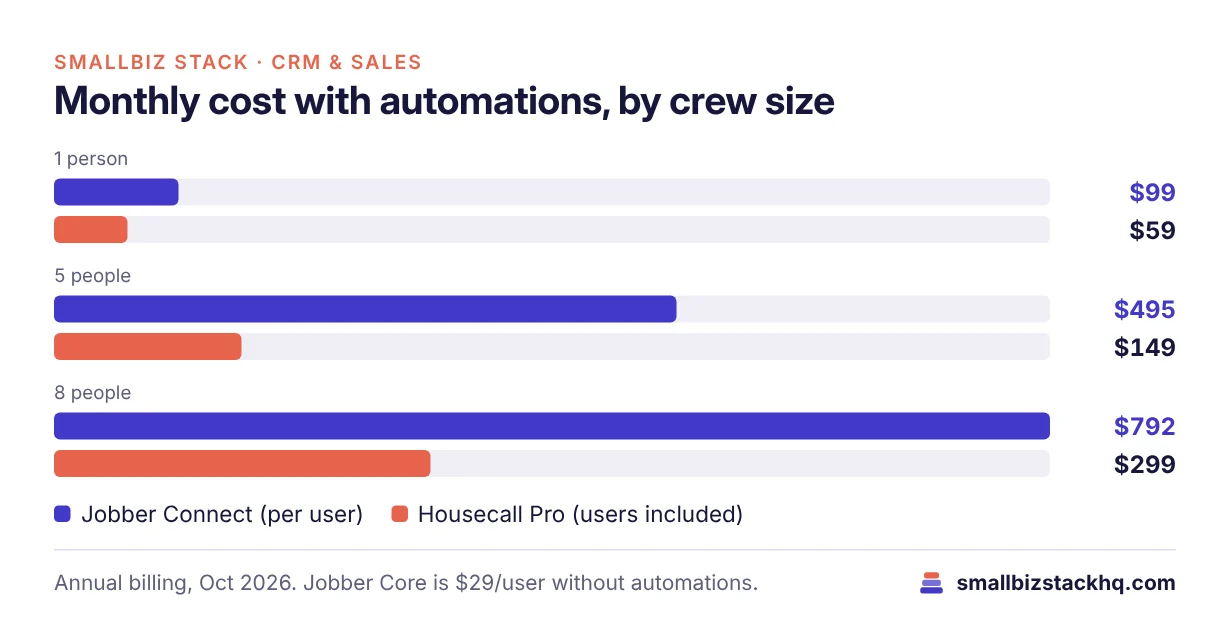
For a solo operator, Jobber Core is the cheapest. For a crew that wants automations, Housecall Pro’s per-company pricing is far cheaper than Jobber Connect: at five people, Housecall Pro Essentials costs $149 against $495 for Jobber Connect.
Features compared
Booking, quotes and scheduling
Both offer online booking, professional quotes and drag-and-drop scheduling. Housecall Pro’s Basic plan already includes dispatch, a price book and job costing. Jobber adds optional line items on quotes and job costing on Grow.
Automation
Jobber Connect adds automated reminders, quote and invoice follow-ups and automatic payment collection. Housecall Pro Essentials adds checklist automations and flat-rate pricing; MAX adds recurring service plans.
Field team management
Housecall Pro Essentials includes GPS tracking, route planning and photo reports, and MAX adds route optimization with live traffic. Jobber includes time tracking from Connect and automatic time tracking on Grow.
Accounting integration
Housecall Pro syncs with QuickBooks Online from Essentials. Jobber also integrates with QuickBooks Online on its mid tiers. See QuickBooks Online plans compared.
Three real-world scenarios
A solo handyman. Jobber Core at $29 a month (annual) covers booking, quotes and invoices. Housecall Pro Basic costs $59.
A 4-person cleaning company. It needs reminders, route planning and photo checklists. Housecall Pro Essentials at $149 a month covers up to 5 users; Jobber Connect for 4 users would cost $396.
An 8-technician HVAC business selling maintenance plans. Housecall Pro MAX at $299 a month includes recurring service plans and route optimization for 8 users.
Questions to ask before you sign up
- How many people need the app? This decides which pricing model is cheaper.
- Which automations matter on day one? Reminders, follow-ups and payment collection drive most time savings.
- Do you sell maintenance plans? Recurring service plans are on Housecall Pro MAX.
- Which accounting software do you use? Check the plan tier for QuickBooks sync.
- What are the card processing rates? Both process payments; compare rates for your average invoice.
Hidden costs to budget for
- Card processing: Both apps let customers pay invoices online, and each payment carries a processing fee. On a $400 job, a difference of a few tenths of a percent adds up over a year.
- Monthly vs annual billing: Jobber Core costs $29 per user on annual billing but $49 monthly, a 69% difference. Housecall Pro Basic is $59 annually versus $79 monthly.
- Extra users: Housecall Pro MAX charges $35 a month for each user beyond eight. On Jobber, every user is paid at the plan rate.
- Add-ons and marketing tools: Review requests, email marketing and websites may cost extra or require a higher plan.
- Setup time: Importing customers, building a price book and training techs takes a few days on either platform.
Setup checklist for your first week
- Import your customer list from a spreadsheet or your old system.
- Build your services and price book with standard line items.
- Set up online booking hours and the jobs customers can book themselves.
- Customize quote and invoice templates with your logo and terms.
- Connect your payment account and QuickBooks Online if you use it.
- Add your team and set permissions so techs only see what they need.
- Turn on automatic reminders for appointments and unpaid invoices.
Frequently asked questions
Is Jobber cheaper than Housecall Pro?
For one user, yes: Jobber Core costs $29 a month on annual billing against $59 for Housecall Pro Basic. For teams, Housecall Pro is usually cheaper because users are included.
Does Housecall Pro charge per user?
No. Plans include 1, 5 or 8 users. On MAX, extra users cost $35 a month each.
Can I try both for free?
Yes. Both offer free trials; Housecall Pro’s lasts 14 days.
Do they work with QuickBooks?
Yes. Both integrate with QuickBooks Online on their mid and upper tiers.
The bottom line
Jobber is the better value for solo operators and very small crews, especially on its Core plan. Housecall Pro is the better value for crews of three to eight, thanks to included users. Run a free trial of each with your next week of jobs.
Related: Square vs Clover · QuickBooks Online plans