
Last updated: October 2026 | Prices checked against Pipedrive’s and HubSpot’s official pricing pages
Disclosure: SmallBiz Stack is reader-supported. Some links on this site may be affiliate links, which means we may earn a commission at no extra cost to you. This never changes our verdicts. Prices change often, so confirm the current rate on the vendor’s site before you sign up.
Pipedrive and HubSpot are two widely used CRMs for small businesses, but they come from opposite directions. Pipedrive was built by salespeople as a visual pipeline tool: open it and you see your deals moving across stages. HubSpot started in marketing and grew into a platform that covers marketing, sales, service and content, with a free CRM as the front door.
For a small sales team, the question is simple: do you want a focused tool that does deals well at a predictable price, or a free starting point that can grow into a much bigger (and more expensive) system?
Pipedrive vs HubSpot at a glance
| Pipedrive | HubSpot Sales Hub | |
|---|---|---|
| Free plan | No (14-day free trial) | Yes, up to 2 users |
| Entry price | $14/seat/mo (Lite, billed annually) | Starter from $20/seat/mo billed monthly (less annually) |
| Mid tier | Growth $39, Premium $59/seat/mo (annual) | Professional $90/seat/mo (annual), $100 monthly |
| Onboarding fee | None listed | $1,500 one-time on Professional; $3,500 on Enterprise |
| Email sync and tracking | Growth and up | Free and up (with limits) |
| Sales sequences | Growth and up | Professional and up |
| Best for | Small teams that live in their pipeline | Teams that want marketing and sales in one place |
Pipedrive pricing in 2026
Pipedrive charges per seat. These are the prices when billed annually; paying monthly costs more (Pipedrive says annual billing saves up to 42%).
| Pipedrive plan | Per seat per month (annual) | Key additions |
|---|---|---|
| Lite | $14 | Lead, calendar and pipeline management, AI report creation, 500+ integrations |
| Growth | $39 | Full email sync with tracking, automations and nurturing sequences, forecast reports, meeting scheduler |
| Premium (most popular) | $59 | LeadBooster lead generation and routing, lead scoring, data enrichment, contracts and e-signatures |
| Ultimate | $79 | Enhanced security, phone and email enrichment, sandbox account, extended phone support |
Every plan has a 14-day free trial with no credit card required. For most small teams, Growth is the plan that makes Pipedrive worth paying for, because it adds email sync and automations.
HubSpot Sales Hub pricing in 2026
HubSpot’s pricing has more moving parts: seats, onboarding fees and monthly “credits” for AI and data features.
| HubSpot Sales Hub plan | Price per seat per month | Onboarding | Notable limits |
|---|---|---|---|
| Free | $0, up to 2 users | None | 1-to-1 email with HubSpot branding, 3 templates, 1 meeting link, 10 dashboards |
| Starter | From $20 monthly (lower with annual billing) | None | Up to 50 workflows, 15 pipelines, 500 calling minutes |
| Professional | $90 annual / $100 monthly | $1,500 one-time | Sequences, up to 300 workflows, forecasting, 100 custom reports |
| Enterprise | From $150 | $3,500 one-time | Up to 1,000 workflows, 350 pipelines, team-level forecasting |
The big jump is from Starter to Professional. Professional is where sales sequences, custom forecasting and serious automation live, and it comes with a required $1,500 onboarding fee.
First-year cost for a 5-person sales team
| Setup | Calculation | First-year cost |
|---|---|---|
| Pipedrive Growth (annual) | $39 × 5 × 12 | $2,340 |
| Pipedrive Premium (annual) | $59 × 5 × 12 | $3,540 |
| HubSpot Starter (monthly billing) | $20 × 5 × 12 | $1,200 |
| HubSpot Professional (annual) | $90 × 5 × 12 + $1,500 onboarding | $6,900 |
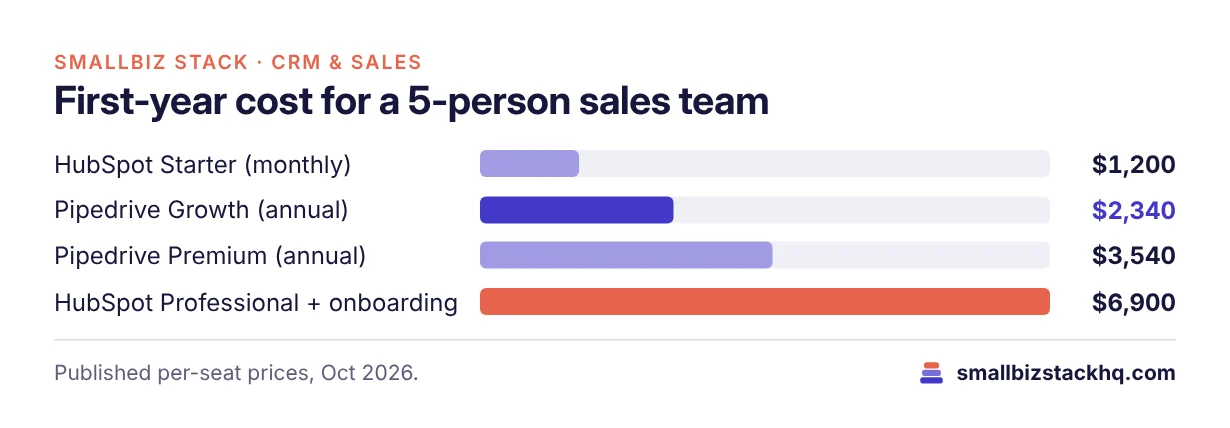
HubSpot Starter is the cheapest paid option on paper, but it lacks sequences. If your team needs automated follow-up emails, the realistic comparison is Pipedrive Growth ($2,340) against HubSpot Professional ($6,900), and that is a big gap.
Features compared
Pipeline management
Pipedrive’s whole interface is built around the pipeline. Deals sit in columns by stage, and you drag them forward as they progress. It is quick to learn and hard to get lost in. HubSpot has a similar deal board, but it sits inside a larger platform with contacts, companies, tickets and marketing tools around it. HubSpot Starter allows up to 15 pipelines; Pipedrive lets you build multiple pipelines too.
Email and follow-up
HubSpot’s free plan already includes 1-to-1 email and tracking, with HubSpot branding. Pipedrive adds full email sync and tracking from Growth. For automated multi-step follow-up, Pipedrive offers nurturing sequences from Growth, while HubSpot’s sequences start on Professional.
Automation
Pipedrive Growth includes workflow automations, such as creating a follow-up task when a deal moves stages. HubSpot Starter includes up to 50 workflows with restricted triggers and actions; Professional unlocks up to 300 fully customizable workflows.
Reporting and forecasting
Pipedrive includes forecast reports from Growth and AI-assisted report creation on every plan. HubSpot adds custom forecasting and up to 100 custom reports on Professional, and team-level forecasting on Enterprise.
Lead generation
Pipedrive Premium adds LeadBooster for capturing and routing leads, plus lead scoring. HubSpot’s strength is marketing: forms, landing pages and email marketing tie straight into the CRM, especially if you also buy Marketing Hub. HubSpot Professional includes up to five lead scores.
Ease of use
Pipedrive is the simpler tool. A small team can be productive in a day. HubSpot is also friendly, but the platform is much broader, and the number of settings grows quickly as you add hubs.
Pros and cons
Pipedrive
Pros
- Clear, visual pipeline that salespeople like using
- Predictable per-seat pricing with no onboarding fees
- Sequences and automations from the $39 Growth plan
- 14-day trial with no credit card
Cons
- No free plan
- Marketing tools are limited compared with HubSpot
- Monthly billing costs noticeably more than annual
HubSpot Sales Hub
Pros
- Genuinely useful free CRM for up to 2 users
- Connects sales, marketing and service in one platform
- Powerful automation and reporting on Professional
Cons
- Big price jump from Starter to Professional
- Required onboarding fees on Professional and Enterprise
- Credits and add-ons make total cost harder to predict
Which should you choose?
Choose Pipedrive if your team’s day is about moving deals forward, you want sequences and automation without enterprise pricing, and you prefer a tool your reps will adopt without training.
Choose HubSpot if you want to start free, you plan to run marketing (forms, emails, landing pages) from the same system, or you expect to grow into a larger platform and are willing to pay for it later.
A practical path for many small businesses: start on HubSpot Free to organize contacts, and if your team needs automated follow-up before you are ready for HubSpot Professional’s price, test Pipedrive Growth on its free trial.
Frequently asked questions
Is HubSpot CRM really free?
Yes. The free plan supports up to 2 users with contact management, deal tracking, 1-to-1 email and basic reporting. Emails carry HubSpot branding, and advanced features need a paid plan.
Is Pipedrive cheaper than HubSpot?
At the level where most teams need sequences and automation, yes. Pipedrive Growth costs $39 per seat per month on annual billing, while HubSpot Professional costs $90 per seat plus a $1,500 onboarding fee.
Can Pipedrive send marketing emails?
Pipedrive focuses on sales emails and sequences. For newsletters and campaigns, most teams connect a separate email marketing tool.
Does HubSpot charge an onboarding fee?
Only on Professional ($1,500) and Enterprise ($3,500). Free and Starter have no onboarding fee.
Which CRM is better for a solo business owner?
HubSpot Free is hard to beat for a solo owner who mostly needs to organize contacts and deals. If you want pipeline automation, Pipedrive Lite or Growth are affordable for a single seat.
The bottom line
Pipedrive gives small sales teams a focused, affordable pipeline tool with automation at a fair price. HubSpot gives you a free start and a path to an all-in-one platform, but the useful sales automation sits behind a much higher price. Run both trials with your real deals for a week before you decide.
Related guides
These comparisons connect directly to this topic:
- monday CRM vs Pipedrive (2026): Which Is Better for Small Sales Teams?
- Zoho CRM vs HubSpot (2026): Which CRM Is Better Value for Small Businesses?
- Best CRM for Real Estate Agents (2026): Follow Up Boss vs HubSpot
- HubSpot vs Salesforce for Small Business (2026): Cost, Setup and Fit
Sources and further reading
Plan prices, limits and features in this comparison were checked against the vendors’ own pages listed below. Software companies change plans and prices often, so confirm the current price on the vendor page before you buy. How we research and update articles is explained in our editorial policy.