
Last updated: October 2026 | Prices checked against Jobber’s and Housecall Pro’s official pricing pages
Disclosure: SmallBiz Stack is reader-supported. Some links on this site may be affiliate links, which means we may earn a commission at no extra cost to you. This never changes our verdicts. Prices change often, so confirm the current rate on the vendor’s site before you sign up.
Jobber and Housecall Pro are the two best-known field service apps for home service contractors: plumbers, electricians, HVAC techs, cleaners, landscapers and handymen. Both handle the whole job cycle, from booking and quoting to scheduling, dispatching, invoicing and getting paid. They work as a CRM for contractors: every customer, job and payment in one place.
The biggest practical difference is how pricing scales. Jobber sells its plans by team size (Core covers 1 user; Connect and Grow come in 1-, 5-, 10- and 15-user versions) and charges $29 a month for each extra user. Housecall Pro charges per company and includes 1, 5 or 8 users depending on the plan. For a solo operator, Jobber Core is cheaper; for a crew, compare the plans that match your team size.
Jobber vs Housecall Pro at a glance
| Jobber | Housecall Pro | |
|---|---|---|
| Pricing model | Plans sized by team (1 to 15 users); extra users $29/mo each | Per company, users included |
| Entry plan (annual billing) | Core, $29/mo (1 user) | Basic, $59/mo (1 user) |
| Mid plan (annual billing) | Connect, $99/mo (1 user) or $149/mo (5 users) | Essentials, $149/mo (5 users) |
| Upper plan (annual billing) | Grow, $149/mo (1 user) or $229/mo (5 users) | MAX, $299/mo (8 users) |
| Free trial | 14 days | 14 days |
| QuickBooks Online sync | Connect and up | Essentials and up |
| Best for | Solo operators and small crews wanting automation | Crews of 3–8 technicians |
Jobber pricing in 2026
| Plan | Annual billing | Monthly billing | Highlights |
|---|---|---|---|
| Core | $29/mo (1 user) | $49/mo (1 user) | Online booking, scheduling, quotes, invoices with online payments, reporting |
| Connect | $99/mo (1 user), $149 (5 users), $229 (10 users), $299 (15 users) | $139 (1 user), $199 (5), $299 (10), $399 (15) | Automated reminders and follow-ups, automatic payment collection, time and expense tracking |
| Grow | $149/mo (1 user), $229 (5 users), $299 (10 users), $399 (15 users) | $199 (1 user), $299 (5), $399 (10), $499 (15) | Optional line items on quotes, job costing, two-way SMS, custom automations |
| Plus | $399/mo (5 users), $449 (10), $529 (15) | $499 (5 users), $599 (10), $699 (15) | Marketing tools, premium support |
Annual prices above are Jobber’s regular rates; when we checked, Jobber discounted the first year of annual billing (for example, Core at $21 a month). Each user beyond a plan’s team size costs $29 a month.
Housecall Pro pricing in 2026
| Plan | Annual billing | Monthly billing | Users | Highlights |
|---|---|---|---|---|
| Basic | $59/mo | $79/mo | 1 | Online booking, scheduling and dispatch, estimates, invoices, payments, price book, job costing, reviews |
| Essentials | $149/mo | $189/mo | 5 | Route planning, flat-rate pricing, checklists, photo reports, GPS tracking, QuickBooks Online sync |
| MAX | $299/mo | $329/mo | 8 (+$35 per extra user) | Sales proposals, service plans, route optimization, API access, onboarding specialist |
All Housecall Pro plans include a 14-day free trial, and introductory discounts are often available.
Monthly cost by crew size (annual billing)
| Crew | Jobber Core | Jobber Connect | Housecall Pro |
|---|---|---|---|
| 1 person | $29 | $99 | $59 (Basic) |
| 5 people | $145 | $149 (5-user plan) | $149 (Essentials) |
| 8 people | $232 | $229 (10-user plan) | $299 (MAX) |
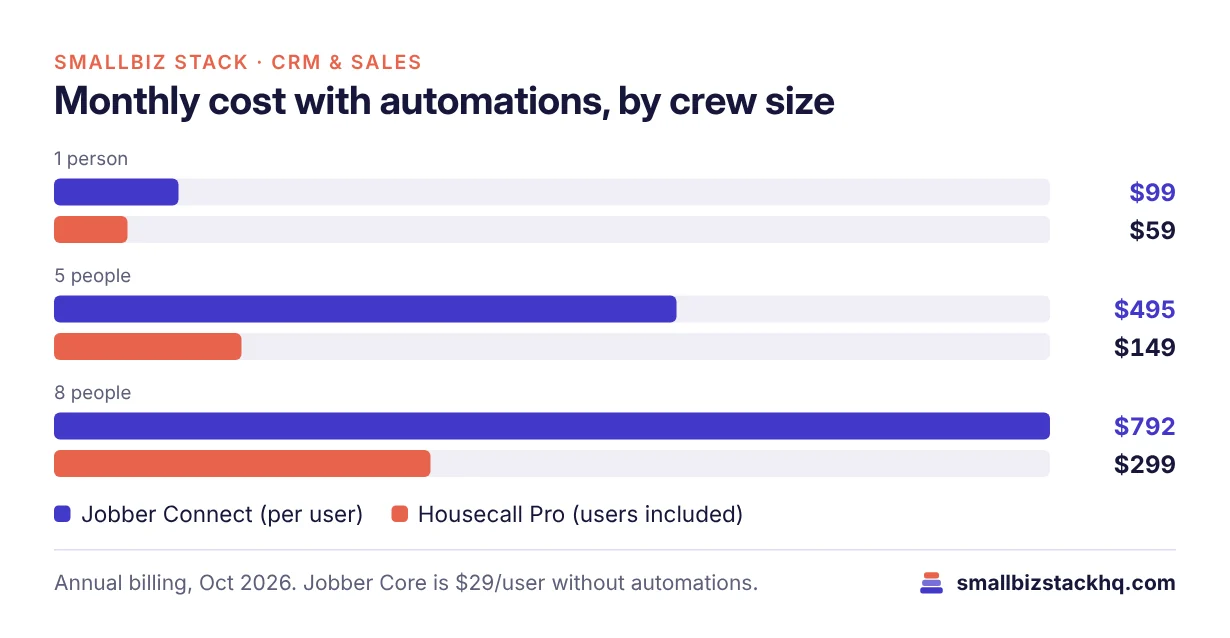
For a solo operator, Jobber Core is the cheapest. For a crew that wants automations, the two are close: at five people, Housecall Pro Essentials and Jobber Connect (5 users) both cost $149 a month on annual billing, and at eight people Jobber Connect (10 users) costs $229 against $299 for Housecall Pro MAX.
Features compared
Booking, quotes and scheduling
Both offer online booking, professional quotes and drag-and-drop scheduling. Housecall Pro’s Basic plan already includes dispatch, a price book and job costing. Jobber adds optional line items on quotes and job costing on Grow.
Automation
Jobber Connect adds automated reminders, quote and invoice follow-ups and automatic payment collection. Housecall Pro Essentials adds checklist automations and flat-rate pricing; MAX adds recurring service plans.
Field team management
Housecall Pro Essentials includes GPS tracking, route planning and photo reports, and MAX adds route optimization with live traffic. Jobber includes time tracking from Connect and automatic time tracking on Grow.
Accounting integration
Housecall Pro syncs with QuickBooks Online from Essentials. Jobber also integrates with QuickBooks Online on its mid tiers. See QuickBooks Online plans compared.
Three real-world scenarios
A solo handyman. Jobber Core at $29 a month (annual) covers booking, quotes and invoices. Housecall Pro Basic costs $59.
A 4-person cleaning company. It needs reminders, route planning and photo checklists. Housecall Pro Essentials at $149 a month covers up to 5 users; Jobber Connect’s 5-user plan costs the same $149 a month on annual billing.
An 8-technician HVAC business selling maintenance plans. Housecall Pro MAX at $299 a month includes recurring service plans and route optimization for 8 users.
Questions to ask before you sign up
- How many people need the app? This decides which pricing model is cheaper.
- Which automations matter on day one? Reminders, follow-ups and payment collection drive most time savings.
- Do you sell maintenance plans? Recurring service plans are on Housecall Pro MAX.
- Which accounting software do you use? Check the plan tier for QuickBooks sync.
- What are the card processing rates? Both process payments; compare rates for your average invoice.
Hidden costs to budget for
- Card processing: Both apps let customers pay invoices online, and each payment carries a processing fee. On a $400 job, a difference of a few tenths of a percent adds up over a year.
- Monthly vs annual billing: Jobber Core costs $29 a month on annual billing but $49 monthly, a 69% difference. Housecall Pro Basic is $59 annually versus $79 monthly.
- Extra users: Housecall Pro MAX charges $35 a month for each user beyond eight. On Jobber, each user beyond your plan’s team size costs $29 a month.
- Add-ons and marketing tools: Review requests, email marketing and websites may cost extra or require a higher plan.
- Setup time: Importing customers, building a price book and training techs takes a few days on either platform.
Setup checklist for your first week
- Import your customer list from a spreadsheet or your old system.
- Build your services and price book with standard line items.
- Set up online booking hours and the jobs customers can book themselves.
- Customize quote and invoice templates with your logo and terms.
- Connect your payment account and QuickBooks Online if you use it.
- Add your team and set permissions so techs only see what they need.
- Turn on automatic reminders for appointments and unpaid invoices.
Frequently asked questions
Is Jobber cheaper than Housecall Pro?
For one user, yes: Jobber Core costs $29 a month on annual billing against $59 for Housecall Pro Basic. For teams, the gap mostly closes because Jobber also sells 5-, 10- and 15-user plans, so compare the plan that matches your crew size.
Does Housecall Pro charge per user?
No. Plans include 1, 5 or 8 users. On MAX, extra users cost $35 a month each.
Can I try both for free?
Yes. Both offer 14-day free trials.
Do they work with QuickBooks?
Yes. Both integrate with QuickBooks Online on their mid and upper tiers.
The bottom line
Jobber is the better value for solo operators and very small crews, especially on its Core plan. For crews, compare the team-size plans: Jobber Connect and Housecall Pro Essentials cost the same at five users, while Housecall Pro MAX adds service plans and route optimization for up to eight users. Run a free trial of each with your next week of jobs.
Related: Square vs Clover · QuickBooks Online plans
Related guides
These comparisons connect directly to this topic:
- Gusto vs ADP RUN (2026): Which Payroll Service Is Better for Small Businesses?
- OnPay vs Gusto (2026): Which Payroll Service Gives You More for Less?
- HubSpot vs Salesforce for Small Business (2026): Cost, Setup and Fit
- Best CRM for Real Estate Agents (2026): Follow Up Boss vs HubSpot
Sources and further reading
Plan prices, limits and features in this comparison were checked against the vendors’ own pages listed below. Software companies change plans and prices often, so confirm the current price on the vendor page before you buy. How we research and update articles is explained in our editorial policy.